

You’ve finally done it, your product is ready, and now comes the exciting moment when you create your first Amazon FBA shipment. Fulfillment by Amazon is a game-changer that transforms your e-commerce business from a time-consuming hustle into a passive income machine. Instead of packing boxes in your garage at midnight, Amazon handles everything. They manage picking, packing, shipping, and even customer service. Meanwhile, you get to focus on what actually matters—creating great products and growing your business.
This comprehensive guide walks you through the entire Amazon FBA shipment process. You’ll learn everything from your first click in Seller Central to watching those tracking numbers light up. We’ll cover real examples, including detailed walkthroughs with actual products. This way, you can see exactly how simple creating an Amazon FBA shipment becomes once you know the steps. Moreover, we’ll highlight the critical mistakes that trip up most beginners. The cash flow trap catches sellers off guard after big sales events like Black Friday.
Whether you’re creating your first Amazon FBA shipment or refining your process, this guide provides everything you need. You’ll ship confidently to Amazon’s warehouses. Furthermore, if you’re looking for comprehensive guidance on launching successfully, the Passion Product Formula offers a step-by-step system with a unique guarantee. Make at least $1,000 in your first year, or we’ll pay you $1,000. That’s how confident we are in the system.
- Understanding Amazon FBA: The Foundation
- Accessing Your Seller Central Account
- Setting Up Your Shipment Details
- Creating Your FBA Shipment
- Understanding Placement Fees and Distribution Strategy
- Verifying Shipping Details and Addresses
- Confirming and Paying for Shipping
- Printing Labels and Preparing Packages
- Critical Timing Considerations
- The Black Friday Mistake: Cash Flow and Inventory Management
- Real Example: Shipping Ground Pork Rinds
- Strategic Distribution and Cost Optimization
- Avoiding Common Shipping Mistakes
- Why 2025 Is Your Year to Launch
- Launching Successfully with Passion Product Formula
- Taking Your First Step Forward
- Frequently Asked Questions
Understanding Amazon FBA: The Foundation
Fulfillment by Amazon means exactly what it sounds like—Amazon does the fulfilling for you. Once your Amazon FBA shipment arrives at their warehouses, Amazon’s massive logistics network takes over completely. They store your inventory and pick items when customers order. They pack them securely and ship them out with Prime eligibility and even handle any customer service issues that arise. Essentially, you’re leveraging the same world-class fulfillment system that made Amazon the e-commerce giant it is today.
The alternative, Fulfilled by Merchant (FBM), requires you to handle every aspect of order fulfillment yourself. While this gives you more control, it also chains you to your inventory. It turns your business into a full-time operations job. Conversely, creating Amazon FBA shipments represents the most passive way to sell on Amazon. Once you’ve done a successful launch week, your product essentially sells itself. As long as you’ve validated that people are actually searching for your product, the sales keep rolling in automatically.
Real Results from Real Sellers
Real-world results prove this system works remarkably well. Many successful sellers who regularly send Amazon FBA shipments generate over $100,000 monthly in revenue. Their primary business activity involves simply monitoring inventory levels and placing reorders. Instead of spending hours daily on fulfillment tasks, these entrepreneurs focus on product development. They work on marketing strategies and scaling their businesses. This is the freedom that the Amazon FBA shipment model provides.
The beauty of this model lies in its simplicity and scalability. You’re not limited by how many hours you can work. You’re not restricted by how many boxes you can pack in a day. Instead, Amazon’s infrastructure scales with your success. They handle ten orders per day just as efficiently as ten thousand. Consequently, your business can grow exponentially without requiring you to build warehouses or hire fulfillment staff.
Accessing Your Seller Central Account
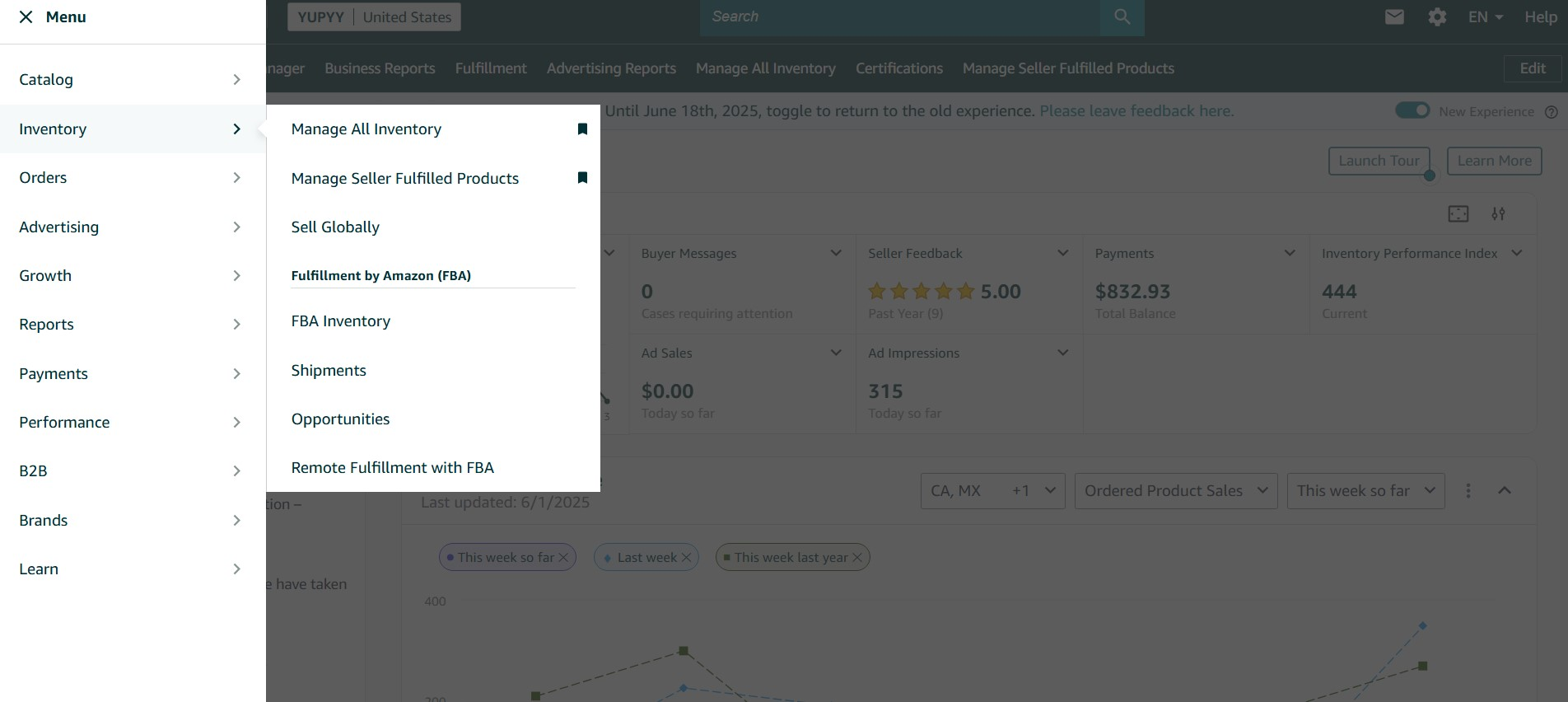
Getting started with your first Amazon FBA shipment begins in your Amazon Seller Central account. This serves as your command center for everything related to your Amazon business. After logging in, click the three horizontal lines in the upper left corner. Navigate to the “Inventory” section. Select “Manage All Inventory.” This page displays all your products available for sale on Amazon. You’ll see products that are currently active, out of stock, or still in draft status.
Next, locate the specific product you want to include in your Amazon FBA shipment. Click the three small dots on the right side of that product row. From the dropdown menu, select “Change to Fulfilled by Amazon.” This critical step switches your product from merchant fulfillment to FBA. It unlocks Prime eligibility and Amazon’s logistics network. The system will then prompt you to make several important decisions about your Amazon FBA shipment.
Choosing Your Barcode Type
First, you’ll need to choose your barcode type for your Amazon FBA shipment. Amazon offers two options: Amazon barcodes or manufacturer barcodes. Amazon barcodes are called FNSKU, which stands for Fulfillment Network Stock Keeping Unit. Manufacturer barcodes are standard UPC codes. Most sellers start with Amazon barcodes because they’re simpler. Amazon provides them free. However, if you plan to sell your product through multiple channels, manufacturer barcodes make more sense. They work universally across all platforms—Shopify stores, retail locations, and other marketplaces.
Additionally, you’ll need to provide dangerous goods information for your Amazon FBA shipment. Amazon requires this for safety and compliance purposes. The system asks whether your product contains batteries. It asks whether it’s considered dangerous goods or hazardous materials. For most standard products, you’ll simply indicate “no battery” and “not hazardous.” Then click submit to proceed. After completing these steps, click “List as FBA and Send to Amazon” to move forward with creating your Amazon FBA shipment.
Setting Up Your Shipment Details

Individual Units vs. Packing Templates
Once you’ve converted your listing to FBA, Amazon asks a key question about your Amazon FBA shipment. Do you want to send individual units or create a packing template? Individual units work well for small Amazon FBA shipments. They also work when you’re sending varying quantities. This option proves ideal for testing a new product with minimal inventory. However, creating a packing template streamlines the Amazon FBA shipment process significantly for larger orders. It makes future reorders incredibly simple.
Creating a packing template for your Amazon FBA shipment involves naming it something recognizable. Names like “Main Pork Rind” or “Standard Box Template” work well. Select “case pack” as the type. Specify how many units fit in each box. For instance, if you’re shipping 20 units per box in your Amazon FBA shipment, you’d enter that number. Then add your box dimensions. Many sellers use standard box sizes like 12x12x12 inches. They’re easy to source and ship efficiently. Accurate dimensions matter tremendously because incorrect measurements can lead to Amazon FBA shipment rejections or unexpected charges.
Calculating Weight and Dimensions
Weight calculations for your Amazon FBA shipment require some basic math but follow a straightforward formula. First, find your per-unit weight from your product listing or by weighing a sample. Then multiply that weight by the number of units per box in your Amazon FBA shipment. This gives you your total product weight. Don’t forget to add the weight of the box and packing materials—typically a pound or two. Interestingly, slightly overestimating your weight proves smarter than underestimating. When shipping with UPS, insufficient postage can cause serious delays and penalties for your Amazon FBA shipment.
Furthermore, you’ll need to specify prep and labeling requirements for your Amazon FBA shipment. Most products require no special prep. Amazon asks because certain items need additional handling. Powders, pellets, and granular materials often require special preparation. Sharp objects, small items, and products sold as sets do too. After confirming “no prep needed,” you’ll choose who labels the units in your Amazon FBA shipment. Always select “seller will label.” Amazon charges 55 cents per unit for this service. An Amazon FBA shipment of 1,000 units would cost you an extra $550 just for stickers you could easily apply yourself.
Creating Your FBA Shipment

After setting up your product details, click “Send and Replenish Inventory” to begin creating your actual Amazon FBA shipment. The system prompts you to enter how many units you’re sending. Start conservatively if this is your first Amazon FBA shipment. Perhaps 10 to 50 units depending on your validation and confidence level. Then click “Ready to Pack” and select “Pack Individual Units.” This works perfectly for most small to medium-sized Amazon FBA shipments.
Next, you’ll need to set your Amazon FBA shipment date. This tells Amazon when to expect your packages. Be realistic here. If today is Monday and you still need to prep and label everything, choosing Wednesday or Thursday makes more sense. Don’t select today. Amazon uses this information to track shipment performance. They may penalize sellers who consistently miss their stated ship dates. It’s better to be conservative and ship your Amazon FBA shipment early than to overpromise and ship late.
Fulfillment Centers vs. Warehousing and Distribution
Now comes a crucial decision point. You’ll choose between Amazon Fulfillment Centers and Amazon Warehousing and Distribution (AWD). The Fulfillment Center represents the standard FBA option. Your products become immediately available for Prime customers to order. These are the front-line warehouses that ship orders directly to customers within two days. In some locations like Los Angeles, delivery happens within one day or even overnight.
Conversely, AWD serves as a long-term storage solution for excess inventory. You don’t need this inventory in active fulfillment immediately. AWD makes sense when you have large quantities of inventory but want to avoid FBA’s long-term storage fees. You can store products at AWD for significantly less money. Then transfer them into FBA with a single click whenever you need to replenish your active stock. This transfer actually happens faster than shipping from your home or a third-party warehouse. Sometimes it takes only a few days instead of the typical two to six weeks. However, for your initial shipment, you’ll almost certainly choose the Amazon Fulfillment Center.
Understanding Placement Fees and Distribution Strategy
About a year ago, Amazon FBAintroduced a distribution fee. This fundamentally changed how savvy sellers approach shipping. This fee exists because Amazon needs your inventory spread across multiple warehouses. They need this to deliver on their famous two-day Prime shipping promise. Think about it, if all your products sat in a California warehouse, customers in New York would never receive their orders within two days. Therefore, Amazon maintains warehouses across the country in strategic locations. They have facilities in California, New York, Florida, Texas, and many other states.
You face two options for distributing your inventory across these multiple locations. First, you can do it yourself by sending separate shipments to at least five different fulfillment centers. This eliminates the placement fee entirely. Second, you can send all your inventory to a single location. Then pay Amazon a placement fee (typically $20-$50 depending on your shipment size) to distribute it for you. While paying the fee sounds convenient, doing it yourself actually saves money. It often results in faster processing times.
The Math Behind Multi-Location Shipping
Let’s examine a real example to understand the cost difference. Sending one shipment to a single location might cost $8 in shipping. But it includes a $30 placement fee, totaling $38. Meanwhile, sending five separate shipments to five different warehouses might cost $42 total, just $4 more. But you pay zero placement fee. Moreover, when you send directly to multiple locations, Amazon FBA begins processing all five shipments simultaneously. They don’t wait to receive your single shipment, redistribute it internally, and then process it at each location.
Choosing your shipping method depends entirely on your shipment size. Small Parcel Delivery works for anything less than a pallet. This describes most shipments for new or small sellers. Less Than Truckload (LTL) shipping becomes relevant when you’re sending one or more pallets but not filling an entire truck. Full Truckload shipping applies only when you’re moving massive quantities of inventory. This typically happens for established sellers with proven products. For your first few shipments, Small Parcel Delivery through UPS will almost certainly be your best option.
Verifying Shipping Details and Addresses
Here’s where most beginners make their biggest and most costly mistake. They fail to verify their shipping address. The “ship from” address that appears in your shipment details must match exactly where you’re actually shipping from. Yet Amazon sometimes auto-fills this with outdated information. They might use your business registration address rather than your current location. If this address is wrong and you’re shipping from somewhere completely different, UPS will reject your shipment. Your products won’t go anywhere. Amazon may charge you significant penalties.
Triple-checking this address before confirming your shipment takes only thirty seconds. But it prevents hours of headaches and potential costs. Look at the top of your shipment page where it displays “Ship From.” Verify that this matches your current location exactly. If you’re sending five separate shipments to five different fulfillment centers, you’ll need to verify this address for each individual shipment. Fortunately, you can update all addresses at once using the main address field at the top. You can also change them individually using the “Change” button next to each shipment.
How Address Changes Affect Costs
Interestingly, updating your shipping address sometimes affects your shipping costs. Usually it changes by just a few dollars depending on how far the correction moves your location. For instance, if Amazon thought you were shipping from Los Angeles but you’re actually in San Diego, the cost might increase or decrease by $2-5 per shipment. While these adjustments seem small, they reflect the real distance your packages will travel. Accuracy matters tremendously for maintaining a good seller account standing.
Additionally, when scheduling pickup, an incorrect address creates major problems. Most sellers schedule pickups rather than dropping packages at UPS stores. With the wrong address, the UPS driver shows up at the wrong location entirely. Not only do your packages not get picked up, but you’ve now missed your shipment window. You need to reschedule everything. This delays your inventory reaching Amazon. It potentially causes you to miss launch dates or go out of stock during critical selling periods. Therefore, spending those extra few seconds to verify addresses ranks among the most important steps in the entire shipping process.
Confirming and Paying for Shipping
The 24-Hour Safety Window
Once you’ve verified all your details and addresses, it’s time to finalize your shipment. Click “Accept Charges and Confirm Shipping.” Amazon immediately charges these shipping costs to your credit card on file. Make sure you have sufficient funds or credit available. However, Amazon provides a valuable safety net: you have exactly 24 hours to cancel the shipment. This works if you discover any errors or if circumstances change.
This 24-hour cancellation window offers crucial protection for your account health. Maybe you realize after confirming that you entered the wrong weight. Perhaps you forgot to prep your products properly. Or you won’t have everything ready by your ship date. You can cancel without penalties, but only within those first 24 hours. After that window closes, canceling becomes much more complicated. It may result in fees or negative marks on your seller performance metrics. Therefore, immediately after confirming, do one final review of all your shipment details.
Understanding Price Adjustments
Sometimes, you’ll notice that your final price changes slightly after confirmation. This happens because Amazon’s system recalculates costs. They base it on the exact warehouse assignments and current UPS rates. In some cases, the price actually decreases. One real example saw costs drop from an estimated $42 to just $33 after address updates and final calculations. These adjustments usually amount to just a few dollars either direction. They reflect Amazon’s efforts to provide accurate, competitive pricing for their partnered carrier rates.
Speaking of rates, Amazon’s partnership with UPS delivers substantially better pricing. You won’t receive these rates negotiating with UPS directly or using other carriers. In fact, 99% of the time, Amazon’s partnered carrier rates beat any other option available. This holds true even if you have a business account with UPS or FedEx. Amazon ships millions of packages annually. This gives them negotiating power that individual sellers simply cannot match. Consequently, using non-partnered carriers almost never makes financial sense.
Printing Labels and Preparing Packages

After confirming your shipment, Amazon generates all the necessary labels. You’ll see tracking numbers appear for each box. Now you face a choice about how to print these labels. This decision significantly impacts your long-term efficiency. The first option involves printing on standard US letter-sized paper (8.5×11 inches). Use any regular printer. Then tape these paper labels onto your boxes. This method works perfectly fine. It requires no special equipment. It costs essentially nothing if you already own a printer.
However, investing in a thermal printer transforms this process from tedious to effortless. Thermal printers cost around $60 on Amazon. They offer two massive advantages: they don’t use any ink (saving money on cartridges), and they print on self-adhesive sticker paper. You simply peel and stick. No more cutting labels and more tape. No more labels falling off during transit. For sellers who plan to ship regularly, this small investment pays for itself within just a few shipments.
Understanding Your Label Requirements
Each shipment requires two distinct labels that serve different purposes. First, the UPS shipping label tells the carrier where to pick up your package. It shows which route to use for delivery. Second, the Amazon warehouse label tells warehouse workers exactly where to place your products once they arrive. Both labels must be clearly visible on the outside of each box. Typically place them on the top or largest side panel where scanners can easily read them. Never place labels on box seams or corners. They might get damaged or folded during transit.
Additionally, don’t forget about the individual product labels. These are the FNSKU or UPC barcodes that go on each unit inside your boxes. If you’re using FNSKU labels, you’ll need to print these separately. Apply them to each product before boxing everything up. Many sellers order label sticker paper from Amazon. It works perfectly with standard printers. It costs just a few dollars for hundreds of labels. Alternatively, smart sellers include these barcodes directly in their product packaging during manufacturing. This eliminates the labeling step entirely and saves tremendous time with every shipment.
Critical Timing Considerations
Setting Your Release Date
Before you start celebrating that your shipment is on its way, there’s one critical setting you must configure. You need to protect your launch strategy with the product release date. Many new sellers overlook this step entirely. Then they watch in horror as their products go live on Amazon the moment the warehouse receives them. This often happens weeks before they’re ready for a proper launch. Amazon’s system automatically makes products available for purchase as soon as they’re checked in. This happens unless you explicitly set a future release date.
Setting this release date requires navigating back to your Manage Inventory page. Click on your product. Edit the listing to include a release date well into the future. For example, if today is May 12th and you expect your inventory to arrive around May 20th, set it appropriately. But if you want to launch on May 30th, set that May 30th date as your release. This prevents your listing from going live prematurely. It ensures you control exactly when customers can start ordering.
Why Your First Week Matters
Understanding why this matters requires recognizing that your first week on Amazon literally determines your long-term success. During launch week, Amazon’s algorithm watches closely. It evaluates whether you’re running a serious business that will generate sustained sales. Or are you just casually trying something that might fizzle out? Products that gain momentum quickly during their first week receive favorable treatment in search rankings. This potentially sets them up for long-term success. Conversely, products that trickle out a few orders here and there without any coordinated launch effort often struggle to gain traction.
Amazon’s receiving and processing timeline also demands careful planning. While some shipments get processed within a week or two, the safe expectation is four to six weeks. This covers from the day you ship until your products become available for sale. Sending to multiple warehouses simultaneously can speed this up. Holiday seasons and busy periods like Q4 can push this timeline even longer. Sometimes taking the full six weeks or more. Therefore, always plan backward from your desired launch date. Add buffer time to account for potential delays.
The Black Friday Mistake: Cash Flow and Inventory Management

The Cash Flow Trap
Picture this common scenario that traps countless Amazon sellers every year. You have a successful Black Friday, Cyber Monday, or holiday season and sell through your entire inventory faster than expected. You celebrate the sales milestone, feeling accomplished and excited about your business growth. Then reality hits hard. You have no cash available to reorder inventory. Amazon holds your payments for up to two weeks. Yet your supplier demands payment upfront for the next production run.
Every single day you’re out of stock actively damages your business in multiple ways. Amazon’s algorithm immediately begins penalizing your search rankings. Unavailable products provide terrible customer experience. Your competitors, still in stock, rise in the rankings while you fall. They capture customers who might have bought from you. When you finally get inventory back in stock weeks later, you’re starting from a much lower position. Climbing back up proves incredibly difficult. Some sellers never recover their pre-stockout rankings. They’re effectively resetting their business progress.
Why Traditional Banks Don’t Work
Traditional financing options fail Amazon sellers for several reasons. Banks move too slowly and impose rigid requirements that don’t match e-commerce cash flow patterns. By the time you get approved for a traditional business loan, your critical sales window has already passed. That’s assuming you get approved at all. Banks also don’t understand the seasonal nature of Amazon sales. They struggle to evaluate your business based on standard financial metrics. Furthermore, they typically require personal guarantees and collateral. They demand extensive paperwork that adds weeks to an already slow process.
This is precisely why revenue-based financing platforms like Wayflyer have become essential tools. Wayflyer specifically built their platform for e-commerce businesses. They integrate directly with your Amazon account to make real-time funding decisions. These decisions base on your actual sales data. They provide capital in just 24-48 hours. You don’t give up any ownership or equity in your company. Repayment happens automatically as a small percentage of your daily sales. Slow weeks result in smaller payments. You’re never strapped for cash during temporary dips.
Getting Capital Fast
They’ve already funded over $5 billion to e-commerce brands. They have $1 billion ready specifically for sellers preparing for Q1 2025. Check out Wayflyer using the link below to get your offer within 24-48 hours. This ensures cash flow never kills your momentum. You can pay suppliers while waiting for Amazon payments. The flexible repayment structure means you only pay based on what you’re actually earning. Plus, they include free analytics tools to help you track and optimize your business performance.
Real Example: Shipping Ground Pork Rinds
Product Background and Validation
Let’s walk through a real-world example with an actual product. This shows you exactly how this entire process works in practice. The product in question is ground pork rinds. These are essentially pork rinds that have been ground into a powder. They serve as a breadcrumb alternative for people following carnivore or low-carb diets. This product was discovered and validated using Helium 10. The tool revealed that people actively search for this solution. Competition remains relatively low, especially when marketed specifically toward the carnivore diet community.
Starting from the Seller Central homepage, navigate to Inventory. Click Manage All Inventory to find your product listing. This particular listing shows as “unavailable” because inventory hasn’t reached Amazon’s warehouses yet. After locating the product, click “Replenish Inventory” to begin the shipping process. Remember, we’ve already converted this listing to FBA in advance. This means Amazon will handle all the picking, packing, shipping, and customer service once inventory arrives.
Creating the Packing Template
For this shipment, creating a packing template makes sense. We’ll be sending 100 units organized into five boxes of 20 units each. The template gets named “Main Pork Rind” to distinguish it from potential future variations or sizes. Each box measures 12x12x12 inches. This represents a standard cube size that ships efficiently. It fits most products reasonably well. Weight calculations require quick math: if each unit weighs 4 ounces and we’re packing 20 units per box, that equals 80 ounces. That converts to 5 pounds of product weight. Adding the box and packing materials, we round up to 6 pounds per box. This ensures we have adequate postage.
Regarding barcodes, this product uses manufacturer UPC codes rather than Amazon FNSKU labels. This strategic decision was made because the long-term plan includes selling these pork rinds through multiple channels. Not just Amazon, but also potentially on a Shopify store. Maybe in retail locations and on other marketplaces. UPC codes work universally across all sales channels. FNSKU codes only work within Amazon’s ecosystem. Converting to use manufacturer barcodes simply requires clicking a button in the prep guidance section. Amazon accepts this for most product categories.
Strategic Distribution and Cost Optimization
Making Future Reorders Simple
With the packing template created and saved, the system now makes future reordering incredibly simple. Just enter how many boxes you’re sending and click a few buttons. For this shipment, we’re sending five boxes to five different fulfillment centers. This avoids Amazon’s placement fee entirely. This strategy typically saves $20-30 per shipment. It results in faster processing because Amazon begins handling all five shipments simultaneously. They don’t receive one shipment first, then redistribute it internally.
Looking at the shipment options, you’ll notice both options appear. Amazon Fulfillment Center (FBC) and Amazon Warehousing and Distribution (AWD) are both choices. For this launch shipment, FBC is clearly the right choice. We need these products available for customers to order immediately. However, understanding AWD proves valuable for future shipments when you have excess inventory. AWD charges significantly lower storage fees than FBC. It allows you to keep backup inventory close to Amazon’s system without paying expensive long-term storage fees.
The 90-Day Rule
The critical rule with FBC inventory: never let products sit for more than 90 days. After that 90-day threshold, Amazon begins charging long-term storage fees. They need to keep warehouse space available for active, fast-moving inventory. These fees escalate quickly. They can completely erase your profit margins on slow-moving products. Smart sellers keep roughly 30-60 days of inventory in FBC at any given time. They store additional backup inventory either at AWD, at their manufacturer’s facility, with a third-party logistics provider (3PL), or in worst-case scenarios, in their own garage or storage unit.
Regarding shipping methods, this 100-unit, five-box shipment clearly calls for Small Parcel Delivery through UPS. The total cost shows as approximately $42 for all five shipments combined. This is far less than the single-shipment option. That would cost around $38 but include a $30 placement fee (totaling $68). Less Than Truckload (LTL) shipping wouldn’t make sense here because LTL requires pallets. We only have five medium-sized boxes. However, once you’re regularly shipping hundreds or thousands of units, LTL becomes worth investigating. The per-unit cost often drops significantly when you can send full pallets.
Avoiding Common Shipping Mistakes

The number one mistake new sellers make involves shipping from an incorrect address. This cannot be emphasized enough. Amazon’s system sometimes autofills your registered business address. Or it uses your billing address. Maybe it pulls a previously used shipping address rather than where you’re actually located right now. When the shipping address shows California but you’re actually in Texas, problems arise. UPS shows up in California expecting packages that don’t exist. Your shipment fails completely. Amazon may assess significant penalties against your seller account for non-compliance.
Preventing this mistake requires just 30 seconds of attention. Look at the “Ship From” address at the top of every shipment. Verify it matches your current location exactly. If you’re sending multiple shipments (the five-location strategy), check each individual shipment. Or update the master address at the very top to apply your correction across all shipments. Sounds simple, yet this single error causes more shipping failures than any other issue. It costs sellers time, money, and potentially damages their account health metrics.
Other Critical Mistakes to Avoid
Another frequent mistake involves not setting a future release date. This allows products to go live the moment Amazon receives them instead of launching strategically. Remember, your first week determines everything. Amazon evaluates whether you’re serious based on your launch momentum. Products that randomly go live and generate a few scattered orders look completely different to the algorithm. This differs greatly from products that launch with coordinated marketing, promotions, and immediate sales velocity. Set that release date far enough in the future. Give yourself time to prepare your launch strategy. Coordinate with any partners or influencers. Build anticipation.
Finally, many sellers waste money by paying Amazon 55 cents per unit to apply labels. They could do this simple task themselves. On a 1,000-unit shipment, that’s $550 thrown away. The task takes maybe an hour with a thermal printer or a couple hours applying stickers by hand. Even if you value your time at $50 per hour, spending two hours labeling to save $550 represents a 275% return on your time investment. Order some label sticker paper from Amazon for under $15. Print your labels and apply them while watching TV. It’s truly that simple and saves substantial money over time.
Why 2025 Is Your Year to Launch

The Perfect Storm of Opportunity
Market conditions right now present one of the best opportunities in years to launch new products on Amazon. E-commerce continues accelerating as more consumers shift their shopping habits online. Yet many traditional retailers still haven’t adapted effectively to compete. Moreover, the tools and resources available to new sellers today make launching easier and less risky than ever before. Platforms like Helium 10 for product research, comprehensive training programs, and revenue-based financing options have transformed the landscape. All these resources existed separately before. Now they work together seamlessly.
What makes this moment particularly unique is the combination of high consumer demand with accessible validation tools. You no longer need to guess whether people want your product. You don’t take blind risks with thousands of dollars. Instead, platforms like Helium 10 show you exactly what people are searching for. They reveal how much competition exists. They show what price points work. This data-driven approach to product selection dramatically increases your odds of success. It reduces the trial-and-error that used to define Amazon selling.
The Cost of Waiting
Furthermore, Amazon itself continues expanding its marketplace. They’re adding new categories and improving seller tools. They’re investing billions in logistics infrastructure. This expansion creates opportunities for new sellers to establish themselves in emerging niches. They can do this before these niches become saturated. Waiting another year means more competition will have discovered the opportunities you’re considering today. Every month you delay represents not just lost potential income. It also means allowing competitors to establish market positions that will be harder to challenge later.
The barrier to entry has never been lower, yet the potential returns remain substantial. Successful Amazon sellers regularly generate $5,000 to $100,000 monthly in revenue. Profit margins typically range from 20-40% depending on product category and efficiency. Unlike traditional businesses requiring storefronts, employees, and massive overhead, Amazon FBA allows you to start differently. You can begin with a single product and modest investment. Then scale based on results. However, the one thing that separates successful sellers from those who struggle is simple. It’s having proper guidance from people who have already achieved the results you want.
Launching Successfully with Passion Product Formula

Your first week on Amazon isn’t just important. It literally determines whether your product succeeds or struggles indefinitely. During those critical first seven days, Amazon’s algorithm pays extremely close attention. It watches your sales velocity, conversion rate, and customer response. Products that demonstrate strong immediate traction receive favorable placement in search results. This creates a virtuous cycle where visibility drives sales, which drive more visibility. Conversely, products that launch weakly often get buried in search results. This makes it exponentially harder to gain momentum later.
This is exactly why the Passion Product Formula exists. It ensures your launch week creates maximum impact. It sets your product up for long-term success. The program provides a comprehensive, step-by-step system covering everything. This includes product research and validation through supplier sourcing. It covers listing optimization, launch strategies, advertising, and scaling. You can literally see the proof behind us: shelves filled with successful products from students who followed this exact system. Many of them now generate five and six figures monthly selling on Amazon.
Our Unique Guarantee
What makes this program unique is the confidence we have in its effectiveness. We demonstrate this through our guarantee: make at least $1,000 in your first year selling on Amazon, or we’ll pay you $1,000. No other Amazon training program offers this kind of guarantee. Frankly, most programs don’t deliver results. We can make this promise because we’ve refined this system over years. We’ve tested it with hundreds of students. We know it works when followed properly.
Getting started takes just one simple step. Click the link in the description below to book a free one-on-one strategy call with someone on our team. During this call, you’ll learn exactly how to sell on Amazon. You’ll receive a complete personalized game plan for your specific situation. You’ll discover whether the Passion Product Formula makes sense for your goals. There’s absolutely no obligation. Even if you decide the program isn’t right for you, you’ll walk away with valuable insights about launching on Amazon.
Free Training Available Now
Alternatively, if you want to start learning immediately without any cost, we have options. We offer a completely free 12-hour Amazon FBA course available on YouTube right now. It covers the fundamentals every seller needs to know. This comprehensive training walks you through product research, supplier negotiations, listing creation, and launch strategies. Everything you need to understand the Amazon FBA business model. You can start watching immediately and begin building your knowledge foundation today.
Taking Your First Step Forward

Shipping to Amazon FBA transforms from intimidating to straightforward once you understand the process. Following this guide step-by-step, you’ll convert your listing to FBA in Seller Central. You’ll set up your shipment details with accurate dimensions and weights and choose a strategic distribution approach, preferably five or more locations to avoid placement fees. You need to meticulously verify your shipping addresses and print your labels efficiently. You’ll set a future release date to protect your launch strategy.
The bigger picture here extends beyond just shipping logistics. Once you’ve sent your first shipment, you’ll understand something important. You’ll see why Amazon FBA represents such a powerful business model. Your primary activities shift from tedious fulfillment tasks to strategic decisions. You focus on product selection, marketing, and growth. Amazon handles the complexity of warehousing, shipping, and customer service. This allows you to focus entirely on building a brand and generating sales.
Stop Waiting and Start Building
Taking action today matters more than perfect preparation. Don’t let complexity or uncertainty paralyze you into inaction. Follow this guide methodically. Avoid the common mistakes we’ve outlined. Consider financing solutions like Wayflyer if cash flow concerns you. Most importantly, plan your launch strategically rather than letting your products randomly go live. Thousands of sellers have walked this exact path before you. They’ve transformed their financial situations through Amazon FBA.
Your next move is clear. If you’re ready to build a real business on Amazon with expert guidance and a guaranteed system, book that free strategy call using the link below. If you want to learn more before committing to anything, watch the free 12-hour course to build your foundation. Either way, don’t let 2025 pass by while you sit on the sidelines wondering “what if.” The opportunity is here. The tools are available. The system is proven. You just need to take that first step.
Frequently Asked Questions
How long does it take for Amazon to receive and process my shipment?
Amazon typically takes two to six weeks to receive and fully process shipments. This timeline varies based on several factors. Shipments sent to multiple fulfillment centers often process faster. Amazon handles them in parallel rather than sequentially. During busy periods like Q4, Black Friday, and the holidays, processing can extend to the full six weeks or occasionally longer. Always plan conservatively by assuming six weeks. Then consider anything faster a pleasant bonus. Setting a future release date protects you from products going live before you’re ready.
Should I use Amazon barcodes (FNSKU) or manufacturer barcodes (UPC)?
The choice depends entirely on your sales strategy. If you plan to sell exclusively on Amazon, FNSKU labels work perfectly fine. They cost nothing. However, if you envision selling through multiple channels, manufacturer UPC barcodes make much more sense. This includes your own website, other marketplaces like Walmart or eBay, or retail stores. UPC codes work universally across all platforms. Most product categories allow you to easily convert between barcode types. Just click a single button in Seller Central. You’re not locked into your initial choice forever.
Is it really worth sending to five different warehouses to avoid the placement fee?
Absolutely, sending to five or more fulfillment centers saves money and accelerates processing in most cases. While it seems more complicated initially, you’re simply printing five labels instead of one. That’s barely any extra work. The placement fee typically ranges from $20-50. You can often send five separate shipments for just a few dollars more than paying that fee. Additionally, sending to multiple locations means Amazon starts processing all shipments simultaneously. They don’t receive one shipment, redistribute it internally, then process each location. This can save you weeks in availability time.
What happens if I enter the wrong shipping address?
Entering an incorrect shipping address creates serious problems that can damage your seller account. UPS will arrive at the wrong location expecting packages that aren’t there. Your shipment won’t be picked up. You’ll miss your stated ship date. Amazon may assess penalties against your account for failing to ship on time. You’ll need to cancel and recreate the entire shipment. This is why verifying your “Ship From” address ranks as the single most important step before confirming any shipment. Take 30 seconds to triple-check this detail every single time.
Should I invest in a thermal printer for labels?
For anyone planning to ship regularly to Amazon, a thermal printer represents one of the best $60 investments you’ll make. These printers eliminate the need for ink cartridges, which saves money over time. They print on self-adhesive sticker paper. No more cutting and taping. They speed up the labeling process significantly. If you’re only doing occasional one-time shipments, regular letter paper and tape work fine. However, if you’re building a real business with ongoing inventory shipments, the time savings and convenience pay for themselves within your first few months.
Can I drop off packages at Amazon warehouses myself?
No, Amazon no longer allows sellers to drop off packages directly at fulfillment centers. This policy changed several years ago due to security concerns and operational efficiency. All shipments must come from recognized carriers like UPS, FedEx, or freight companies. Amazon’s partnered carrier rates through UPS offer excellent pricing. They’re typically better than anything you can negotiate independently. So using their system makes financial sense anyway. You can either drop packages at UPS locations or schedule a pickup from your address. Both options work seamlessly with Amazon’s system.
How do I avoid long-term storage fees?
Amazon charges long-term storage fees for inventory sitting in FBA warehouses longer than 90 days. Avoid these fees by monitoring your inventory levels carefully. Keep roughly 30-60 days of stock in FBA at any time. For excess inventory, use Amazon Warehousing and Distribution (AWD). It offers much lower storage rates. Or keep backup stock at your manufacturer, a third-party logistics (3PL) provider, or your own location. The key is never sending more inventory to FBA than you expect to sell within three months.
What’s the best way to prepare for my first shipment?
Start by ensuring your product is completely ready. Make sure packaging is finalized. Verify barcodes are printed or affixed. Confirm everything meets Amazon’s requirements. Create a checklist including these items: verify shipping address, confirm box dimensions and weights, apply all product labels, print shipping labels, set future release date, and double-check shipment quantities. Take your time with the first shipment to learn the process thoroughly. Consider starting with a smaller quantity (20-50 units) to test the system before committing to larger shipments. Most importantly, set your release date well into the future. This lets you launch strategically rather than letting products randomly go live.