
Having a best AI website builder used to require coding skills, design expertise, and a hefty budget. However, the landscape has dramatically shifted thanks to artificial intelligence. Today, AI-powered website builders are revolutionizing how entrepreneurs, small business owners, and creatives establish their online presence. These innovative platforms can generate professional, fully functional websites in minutes. They eliminate the technical barriers that once stood between you and your digital dreams.
Choosing the right AI website builder isn’t just about convenience. It’s about setting the foundation for your online success. The platform you select will impact everything from your site’s performance and user experience to your monthly expenses and growth potential. With numerous options flooding the market, making an informed decision has become increasingly crucial. This is especially true for anyone looking to build a sustainable online presence.
Throughout this comprehensive guide, we’ll explore four leading AI website builders: Hostinger, Wix, Ionos, and Framer. Each platform offers unique strengths tailored to different user needs and skill levels. Whether you’re launching your first blog, opening an online store, or creating a stunning portfolio, understanding these options will empower you. You’ll make the best choice for your specific situation. By the end of this article, you’ll have a clear understanding of which AI website builder aligns perfectly with your goals, budget, and technical comfort level.

- Understanding AI Website Builders: What Makes Them Special?
- Hostinger: The Best All-Around Choice for Beginners
- Wix: The Powerhouse for Creative Control
- Ionos: The Budget-Friendly Alternative
- Framer: The Designer's Dream Tool
- Comparative Analysis: Making Your Decision
- Getting Started: Your Action Plan
- Taking Action on Your Website Dreams Today
- Frequently Asked Questions
Understanding AI Website Builders: What Makes Them Special?
The Technology Behind AI Builders
AI website builders represent a quantum leap forward in web design technology. Unlike traditional website builders that require you to manually select templates and painstakingly adjust every element, AI-powered platforms use machine learning algorithms differently. They understand your needs and automatically generate customized designs. These intelligent systems analyze your business description, industry trends, and design preferences. They create websites that look professionally crafted from the very first draft.
The benefits of AI website builders extend far beyond speed and convenience. These platforms democratize web design by making professional-quality websites accessible to everyone. This applies regardless of technical background or budget. Additionally, they continuously learn and improve their output based on user interactions and design trends. This means the websites they generate are constantly evolving to meet modern standards. Many AI builders also include integrated business tools like SEO optimization, content generation, and marketing features. These would traditionally require multiple separate subscriptions.
Key Evaluation Criteria
When evaluating AI website builders, several key factors deserve your attention. First, consider the quality and customization options of the AI-generated designs. Some platforms produce cookie-cutter results while others offer genuine personalization. Second, assess the comprehensiveness of the AI toolkit. This includes content writing, image generation, and SEO features. Third, examine the learning curve and whether you’ll have creative control after the initial AI generation.
Finally, evaluate the total cost of ownership. This includes hosting, domain registration, and access to premium features. Now that we understand what sets AI website builders apart and what criteria matter most, let’s dive deep into the top contenders in the market. Each platform brings something unique to the table. Understanding their strengths will help you identify the perfect match for your needs.
Hostinger: The Best All-Around Choice for Beginners
Overview and Key Strengths
Hostinger has emerged as the clear frontrunner for beginners venturing into website creation. This is particularly true for those interested in blogging or e-commerce. What sets Hostinger apart is its remarkable combination of affordability, speed, and a comprehensive AI toolkit. It rivals platforms costing significantly more. The platform doesn’t force you to compromise between budget-friendliness and functionality. Instead, it delivers both in a package that’s genuinely accessible to complete novices.
The genius of Hostinger lies in its complete ecosystem approach. Rather than simply providing a website builder, Hostinger bundles everything together. This includes hosting, AI design tools, content creation features, email marketing capabilities, and e-commerce functionality. All in a single, cohesive platform. This integration eliminates the headache of managing multiple subscriptions. It ensures all your website components work seamlessly together. Moreover, Hostinger‘s infrastructure is built for speed. Your AI-generated website will load quickly and perform reliably. This is crucial for both user experience and search engine rankings.
Beyond the technical capabilities, Hostinger has proven its reliability through impressive adoption numbers. Over 4 million users across 150 countries trust Hostinger to power their web presence. This is a testament to the platform’s dependability and effectiveness. This massive user base also means you’ll find abundant tutorials, community support, and resources. These help you navigate any challenges. The platform’s security features ensure your site and customer data remain protected. This gives you peace of mind as you grow your online business.
Dual Builder Options
Hostinger uniquely offers two distinct AI-powered pathways for website creation. This allows you to choose the approach that best matches your comfort level and time constraints. The first option, Hostinger Horizons, represents the ultimate in automated website generation. This AI-first solution requires minimal input. Simply describe your business in a prompt, and the AI handles everything. This includes layout and design to content and imagery. Horizons is perfect for entrepreneurs who need a professional website immediately. They prefer to focus on their business rather than design details.
The second pathway, Hostinger‘s AI Website Builder, strikes a balance between automation and creative control. While it similarly generates a complete website from your business description, it also provides access to additional features. You get over 150 professionally designed templates and an intuitive drag-and-drop editor. This approach empowers you to customize your AI-generated site extensively. No coding knowledge is required. You can move elements around, adjust colors and fonts, add new sections, and truly make the design your own.
What makes these dual options particularly valuable is that they cater to different stages of your website journey. You might start with Horizons to get online quickly. Then gradually transition to using the AI Website Builder’s advanced features as you become more comfortable. Furthermore, both options include access to Hostinger‘s full suite of AI tools. You’re never locked into a limited feature set regardless of which path you choose.
The flexibility continues even after your initial setup. If you’re not satisfied with your AI-generated design, you can simply click “regenerate.” The system will create an entirely new website concept in seconds. This iterative approach removes the pressure of getting everything perfect on the first try. It encourages experimentation until you find a design that truly resonates with your vision.
Pricing Strategy and Black Friday Deals
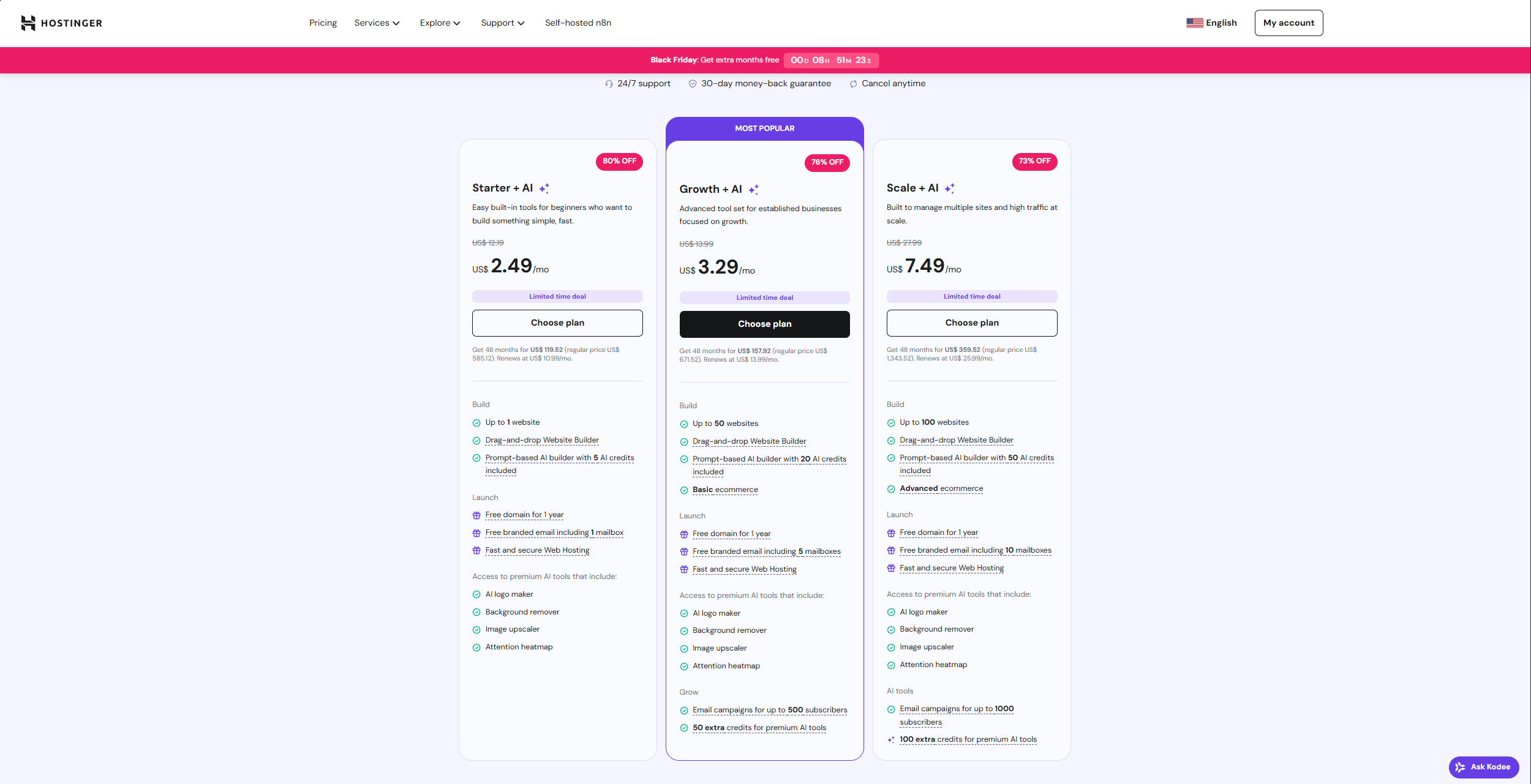
Hostinger‘s pricing structure is refreshingly straightforward. However, understanding the options will help you maximize your savings. The platform offers four subscription periods: 1 month, 12 months, 24 months, and 48 months. While monthly flexibility might seem appealing, the real value lies in the longer-term commitments. The 48-month plan is particularly valuable. This extended commitment locks in the lowest monthly rate. It includes three additional months completely free. This makes it the most economical choice for serious website owners.
The Growth Plus AI plan represents the sweet spot for most users. This is especially true for those building business websites or online stores. This tier provides access to both AI website builders, all AI features, and complete e-commerce functionality. It also includes integrated email marketing tools and the ability to create up to 50 different websites. Currently, early Black Friday pricing brings this plan down to just $3.29 per month on the 48-month commitment. This is remarkably affordable compared to competitors who charge similar amounts for far less functionality.
However, the savings don’t stop there. By using the exclusive coupon code “Travis” at checkout, you’ll receive an additional 10% discount. This comes on top of the already reduced prices. This discount applies whether you choose the 12-month, 24-month, or 48-month plan. It provides flexibility while still ensuring maximum value. These stackable discounts make Hostinger not just affordable but genuinely unbeatable in terms of cost-effectiveness.
Looking ahead, Hostinger has announced an even bigger Black Friday promotion. It runs from November 10th through December 8th, with discounts reaching up to 86% off. During this period, the 48-month Growth Plus AI plan will be available at an even more incredible price point. For anyone considering launching a website, timing your purchase during this window could result in substantial savings. These savings last over the life of your subscription.
Comprehensive AI Features
Hostinger‘s AI toolkit extends far beyond simple website generation. It provides tools that address virtually every aspect of online content creation and optimization. The AI page generator and AI section generator allow you to expand your website organically. You create or modify sections using simple text prompts. Need a new services page, an updated about section, or a compelling call-to-action? Simply describe what you want. The AI generates professionally designed, content-filled sections. These integrate seamlessly with your existing design.
Perhaps the most impressive tool in Hostinger‘s arsenal is the AI content writer. It transforms blog creation from a time-consuming chore into a streamlined process. You select your article type and choose a tone. Options include professional, friendly, casual, or authoritative. Then you decide on the post length and provide content details. Within seconds, the system generates a complete blog post. This includes headlines, structured text, and relevant images. While you should always personalize AI-generated content to match your unique brand voice and ensure authenticity, this tool provides an excellent foundation. It can dramatically accelerate your content marketing efforts.
AI SEO and Additional Tools
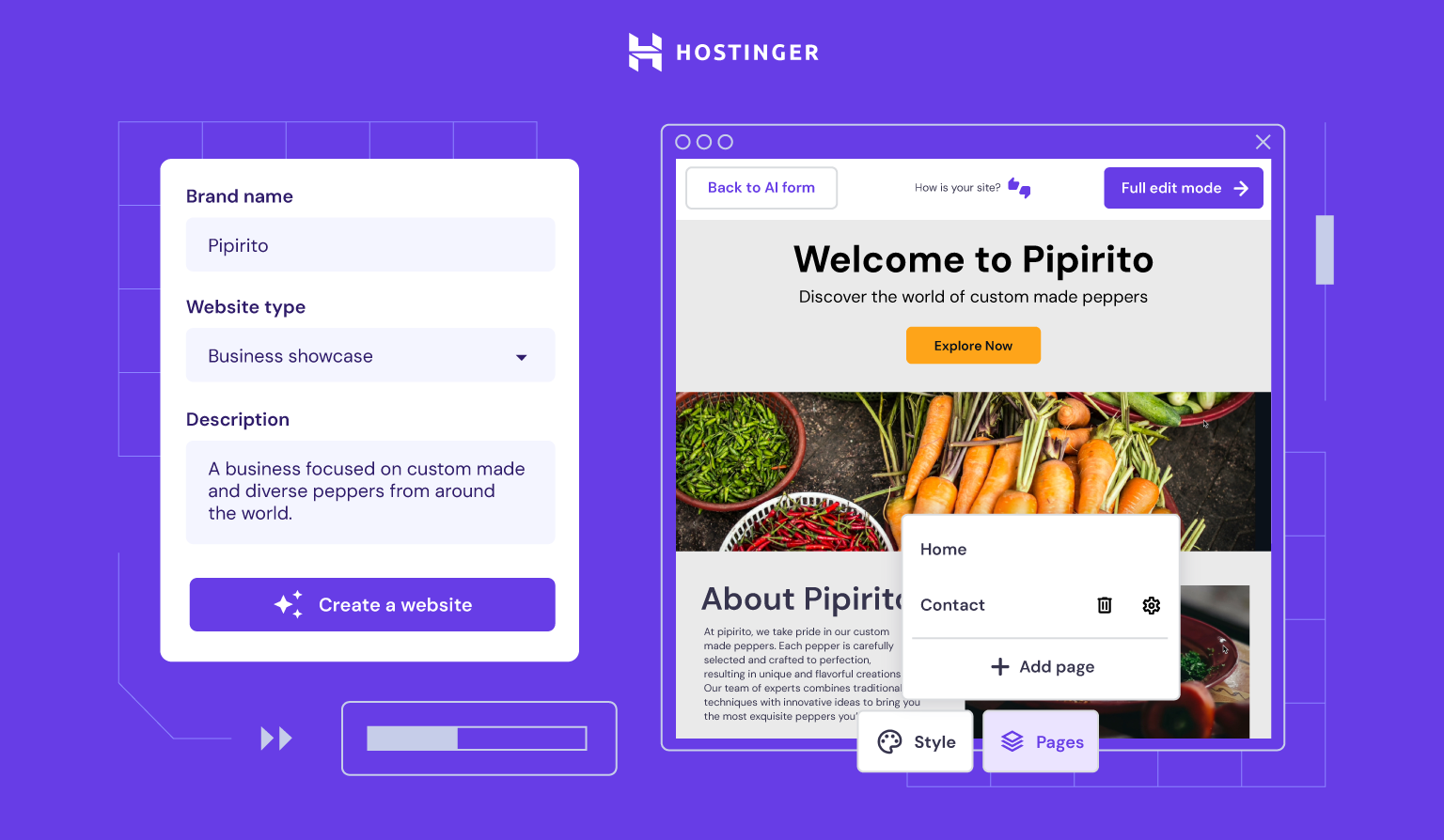
The AI SEO tools integrated into Hostinger deserve special attention. They demystify search engine optimization for beginners. The system automatically generates meta titles and keyword suggestions for all your pages and posts. This takes the guesswork out of SEO basics. This feature is particularly valuable for newcomers who understand that SEO matters but feel overwhelmed by the technical aspects. By following the AI’s suggestions and implementing recommended keywords naturally throughout your content, you can significantly improve your website’s visibility in search results.
Rounding out the toolkit are AI-powered logo and image generators. These give you five free credits to start creating custom visual assets. This means you can develop a cohesive brand identity without hiring a designer or purchasing expensive stock imagery. The platform also includes complete email marketing tools within the Growth Plus AI plan. This allows you to build subscriber lists, create campaigns, and nurture customer relationships. All from the same dashboard where you manage your website.
Trust and Reliability
Beyond features and pricing, Hostinger‘s track record speaks volumes about its reliability as a long-term platform partner. The fact that over 4 million users across 150 countries have chosen Hostinger demonstrates something important. It shows the platform’s global appeal and proven effectiveness. This extensive user base has rigorously tested the platform under diverse conditions and use cases. From personal blogs to high-traffic e-commerce stores, users consistently find it capable of handling their needs.
Security and uptime are critical factors that often get overlooked when people focus solely on features and design. Hostinger maintains robust security protocols to protect your website from threats. It also ensures your site remains accessible to visitors around the clock. The platform’s infrastructure is designed for speed and reliability. Your AI-generated website will load quickly on all devices. It maintains consistent performance even during traffic spikes. These technical considerations might seem minor when you’re starting out. However, they become crucial as your audience grows.
While Hostinger excels in delivering simplicity and comprehensive functionality at an unbeatable price, the website building landscape offers other compelling options. These are for users with different priorities. Next, we’ll explore a platform that trades some of Hostinger‘s simplicity for even more granular creative control and advanced capabilities.
Wix: The Powerhouse for Creative Control

Overview and Target Audience
Wix occupies a distinct position in the AI website builder marketplace. It prioritizes creative freedom and scalability over simplicity and budget-friendliness. This platform is specifically designed for tech-savvy individuals who want absolute control over every visual element of their website. It’s also for businesses that anticipate significant growth requiring advanced features. While Hostinger streamlines the website building process to its essentials, Wix embraces complexity and customization. It provides tools that professionals and serious enthusiasts will appreciate.
The philosophical difference between Wix and simpler builders becomes apparent immediately when you begin working in the editor. Wix doesn’t just offer design flexibility. It provides pixel-perfect control over positioning, advanced animation capabilities, and a robust app marketplace. This marketplace extends functionality in countless directions. This approach makes Wix particularly appealing for agencies managing multiple client sites. It’s also great for creative professionals building portfolio sites, or businesses with specific branding requirements. These requirements demand precise implementation.
However, this power comes with tradeoffs that merit careful consideration. Wix’s pricing structure is significantly higher than competitors. The abundance of features can overwhelm beginners who simply want to get online quickly. The learning curve is steeper, requiring more time investment to master the platform’s capabilities. Nevertheless, for users who value creative control and need room to grow, these challenges might be worthwhile investments. This is true for a platform that won’t limit their ambitions.
Wix ADI (Artificial Design Intelligence)
Wix’s AI offering, called ADI (Artificial Design Intelligence), takes a structured, conversational approach to website generation. Rather than asking for a simple business description, ADI guides you through four carefully designed questions. These cover your business type, aesthetic preferences, required features, and functional needs. This more comprehensive initial interview allows the AI to generate more tailored results. These better match your specific vision from the outset.
After processing your responses, ADI presents multiple sleek, modern layout options rather than a single design. This choice-based approach acknowledges that even with detailed information, personal taste plays a significant role in design preferences. You can review several AI-generated concepts and select the one that resonates most strongly with your vision. This provides a more collaborative feel to the AI generation process.
Once you’ve selected your preferred layout, you transition into Wix’s full editor environment. This is where the platform’s complexity becomes both its greatest strength and potential weakness. The drag-and-drop system offers complete freedom to position elements anywhere on the page. You can adjust spacing down to the pixel and implement sophisticated design techniques. For designers and creative professionals, this granular control feels liberating and empowering. For beginners, it can feel overwhelming and intimidating. This is especially true when compared to more guided builders.
Advanced Features
Wix distinguishes itself through advanced features that cater to serious business needs and sophisticated use cases. The AI text creator, powered by ChatGPT, generates up to three different variations for every text element you create. This gives you options to choose from rather than forcing you to work with a single AI output. This variation approach helps you find the perfect tone and messaging while still benefiting from AI assistance.
The platform’s AI business launcher goes beyond website design to help with strategic planning. This tool assists with brainstorming business ideas, developing action plans, and thinking through the operational aspects of your venture. While this feature might seem tangential to website building, it reflects Wix’s holistic approach. The platform supports entrepreneurs throughout their business journey, not just the web design phase.
For e-commerce operations, Wix offers genuinely enterprise-level capabilities that few competitors can match. The platform supports up to 50,000 products. This makes it viable for large catalogs and serious online retailers. Additionally, Wix provides advanced data analytics tools and A/B testing functionality. This allows you to split traffic between different design variations and measure which performs better. These optimization capabilities are typically found only in expensive standalone tools. Their inclusion in Wix is particularly valuable for data-driven businesses.
Considerations and Drawbacks

Despite its impressive feature set, Wix presents several considerations that might make it less suitable for certain users. The sheer abundance of tools and options can quickly become overwhelming for beginners building their first website. What starts as exciting flexibility can transform into decision paralysis. This happens when you’re faced with countless customization options and unclear which choices will impact your site’s effectiveness.
Pricing represents another significant consideration. Accessing Wix’s full AI features requires plans starting above $17 per month. Costs escalate quickly as you add storage, bandwidth, and advanced tools. For businesses with limited budgets or individuals testing an online venture, these recurring costs might strain resources. This is especially true when compared to platforms offering similar functionality at a fraction of the price.
For those seeking a middle ground between basic simplicity and advanced complexity, another platform offers an intriguing balance. Let’s explore Ionos and how it positions itself as a budget-friendly alternative with solid beginner support.
Ionos: The Budget-Friendly Alternative

Overview and Best Fit
Ionos carves out its niche by focusing squarely on small businesses that prioritize affordability and simplicity above all else. This platform recognizes that many entrepreneurs need a functional online presence without the complexity of advanced features. They also want to avoid the financial burden of premium platforms. Consequently, Ionos strips away sophisticated bells and whistles in favor of straightforward tools. These get the job done without overwhelming users or their budgets.
The platform works particularly well for local businesses, service providers, and solo entrepreneurs. These users need a professional-looking website to establish credibility and provide basic information to customers. If your website goals are straightforward, showcasing your services, providing contact information, perhaps selling a small product range, Ionos delivers what you need. It avoids the feature bloat that complicates many competitors. This focus on essentials makes the platform approachable for people who feel intimidated by technology. It’s also great for those who simply don’t have time to master complex tools.
However, Ionos requires a realistic understanding of what budget-friendly means in practice. While the platform offers cheap pricing plans, achieving truly professional results demands more time and effort than more automated competitors. The AI features are simpler and sometimes less consistent. This means you’ll likely need to invest more hands-on work. You’ll refine the AI-generated foundation into something that truly represents your brand effectively.
Setup and Design Process
Ionos employs a prompt-based creation system similar to other AI builders. It asks you to provide a site description, select a tone, pick colors, and choose fonts. This straightforward approach makes getting started quick and painless. Minimal technical knowledge is required. The interface guides you through each decision point clearly. It ensures you understand what information the AI needs to generate your site.
The challenge emerges when examining the initial designs that Ionos generates. Unlike Hostinger or Wix, which tend to produce consistently polished results, Ionos’s AI can be somewhat inconsistent. Sometimes you’ll receive an attractive, well-structured layout that needs minimal adjustment. Other times, the generated design might feel generic or require substantial customization to meet professional standards. This variability means you should approach the AI generation as a starting point rather than a finished product.
Fortunately, Ionos provides both structured templates and a drag-and-drop editor. This offers design flexibility to improve upon the AI-generated foundation. You can swap out entire sections, adjust layouts, and customize colors and fonts to better align with your vision. While this editing process requires more manual effort than fully automated builders, it’s less complex than Wix’s advanced system. It strikes a middle ground that balances accessibility with customization capability.
Key Business Tools
Where Ionos truly shines is in its built-in business tools that punch above the platform’s budget-friendly price point. The AI SEO text generator deserves particular mention for its simplicity and effectiveness. With a single click, it proposes meta titles and descriptions for your pages. This removes the guesswork from basic SEO optimization. This feature integrates with Ranking Coach, which provides additional SEO guidance. It helps you understand how to improve your site’s search visibility over time.
The AI localization feature represents another standout capability. It supports over 100 languages for businesses targeting international audiences or serving diverse communities. This multilingual support typically requires expensive third-party plugins or manual translation services on other platforms. Its inclusion in Ionos’s budget-friendly package is particularly impressive. For businesses operating in multilingual markets or planning international expansion, this feature alone might justify choosing Ionos over competitors.
Ionos includes an AI image generator, though users should temper their expectations regarding quality. The generated images sometimes appear cartoonish or less sophisticated than those produced by more advanced AI systems. Recognizing this limitation, Ionos compensates by providing a built-in royalty-free stock photo catalog. This features over 17,000 images. This extensive library ensures you can find professional photography to enhance your site. This works even if the AI image generation doesn’t meet your standards.
Limitations to Consider
Transparency about Ionos’s limitations is essential for setting appropriate expectations. While the platform offers genuinely cheap pricing, its AI features and overall tools are relatively simple compared to more expensive competitors. You won’t find the comprehensive AI content writer, sophisticated page generators, or advanced e-commerce capabilities that platforms like Hostinger provide. This simplicity might actually appeal to some users seeking uncomplicated solutions. However, it can feel restrictive as your website ambitions grow.
Time investment represents another consideration often overlooked when evaluating budget platforms. While Ionos costs less upfront, creating something truly impressive requires more hands-on effort. This includes refining AI-generated designs, manually optimizing content, and troubleshooting issues without comprehensive AI assistance. For busy entrepreneurs, the time savings offered by more automated platforms might ultimately prove more valuable. This could outweigh the monetary savings from choosing a budget option. Weigh your resources carefully. Consider whether your constraint is primarily financial or temporal before committing to Ionos.
Finally, let’s turn our attention to a platform that takes an entirely different approach. It prioritizes aesthetic perfection and creative expression above business functionality and beginner-friendliness.
Framer: The Designer’s Dream Tool

Overview and Target Market
Framer occupies a unique position in the AI website builder landscape. It explicitly targets designers and creative professionals rather than general business users. This platform emerged from the professional design tool ecosystem. Its DNA reflects a pure focus on aesthetics, visual storytelling, and pixel-perfect execution. If you’re familiar with professional design software like Figma, Framer will feel like a natural extension of your existing workflow. It’s not a simplified consumer product.
The platform’s philosophy centers on empowering creatives to build stunning, highly visual websites without compromising their artistic vision. Framer understands that designers often have specific ideas about typography, spacing, color theory, and visual hierarchy. Generic templates can’t accommodate these. Consequently, rather than offering business tools and e-commerce features, Framer invests its development resources in sophisticated design capabilities. These satisfy demanding creative professionals.
However, this specialization means Framer isn’t suitable for everyone, or even most website builders. If you’re launching an online store, building a blog to drive traffic, or creating a standard business website, Framer’s lack of e-commerce functionality and business-focused features will quickly become frustrating limitations. The platform excels brilliantly within its niche but struggles outside those boundaries. This makes it crucial to understand your primary website goals before considering Framer.
Core Features
Framer’s AI implementation is elegantly simple yet powerful for its intended purpose. You open a project, click insert, and launch the AI wireframer. After typing in a prompt describing your desired layout, the system instantly builds a complete responsive design. This adapts beautifully across desktop, tablet, and mobile devices. This AI generation focuses specifically on layout and structure rather than business content. This reflects Framer’s design-first philosophy.
The editor interface will delight anyone with professional design experience. It incorporates advanced vector drawing tools that feel remarkably similar to Figma. This allows you to create custom illustrations, icons, and graphics directly within the website builder. This integration eliminates the workflow disruption of switching between design software and website builders. It keeps your creative process fluid and efficient. Additionally, Framer excels at animation. It provides tools to create smooth, sophisticated motion effects. These elevate static designs into engaging interactive experiences.
Framer’s template ecosystem deserves attention for both its quality and its community marketplace model. The platform offers over 1,000 templates. Many are created by professional designers who understand contemporary design trends and best practices. These templates aren’t just starting points. They’re examples of what’s possible within Framer’s system. They inspire your own creative explorations. Moreover, Framer operates a third-party marketplace where designers can sell their own templates. This creates a revenue opportunity for talented creators while expanding options for users seeking premium designs.
AI Capabilities
Compared to business-focused platforms, Framer’s AI toolkit is intentionally limited. The platform includes an AI localization feature for creating multilingual sites. This is useful for designers working on international projects. However, you won’t find AI content writers, logo generators, SEO optimizers, or the comprehensive business AI tools that characterize platforms like Hostinger or Wix.
This limited AI implementation isn’t an oversight. It’s a deliberate design decision reflecting Framer’s target audience. Professional designers typically have established workflows for content creation, branding, and optimization. They’re seeking sophisticated design tools rather than AI assistants to handle business tasks. Framer provides exactly what its audience needs while avoiding feature bloat. This would complicate the interface or dilute the platform’s design focus.
What’s Missing
Understanding what Framer deliberately excludes is as important as knowing what it includes. The platform is not a full site management tool. There’s no built-in e-commerce system for processing payments and managing inventory. There’s also no comprehensive CMS for organizing large amounts of content. If you’re planning to sell products online or regularly publish blog posts to drive traffic, Framer simply isn’t designed for these use cases.
These omissions make Framer unsuitable for most business websites, online stores, or content marketing initiatives. The platform shines for portfolio sites, agency websites, product landing pages, and other primarily visual experiences. In these cases, aesthetics matter more than business functionality. Before choosing Framer, honestly assess whether your website goals align with what the platform does best. Consider if you need the business tools it doesn’t provide.
With all four platforms now thoroughly examined, let’s bring this information together. This will help you make the best decision for your specific situation and goals.
Comparative Analysis: Making Your Decision

Feature Comparison Overview
When comparing these platforms side by side, clear patterns emerge. These illuminate each option’s sweet spot. Hostinger delivers the most comprehensive package at the lowest price point. It combines robust AI features, business tools, e-commerce capability, and beginner-friendly design in a single affordable subscription. This remarkable value proposition makes it the default choice for most users. This is particularly true for those new to website building or operating on limited budgets.
Wix commands premium pricing but justifies the cost through advanced features. It offers scalability to 50,000 products, sophisticated analytics, and pixel-perfect creative control. The platform’s learning curve is steeper. This makes it most appropriate for tech-savvy users or businesses with complex needs that simpler platforms can’t accommodate. Meanwhile, Ionos offers the tightest budget option with basic but functional tools. It accepts some inconsistency and limited AI capability as tradeoffs for rock-bottom pricing. Finally, Framer stands apart entirely. It serves a niche audience of design professionals who prioritize aesthetics above business functionality.
The AI tool availability matrix reveals significant disparities. Hostinger provides the most complete AI toolkit. This includes content generation, SEO optimization, logo creation, and image generation. Essentially everything needed to build and populate a professional website entirely through AI assistance. Wix offers sophisticated AI but at a higher cost. Ionos and Framer provide more limited AI capabilities. These serve their respective niches adequately but lack the comprehensiveness of more business-focused platforms.
Decision Framework by User Type
Understanding which platform aligns with your specific situation requires honest self-assessment. Consider your skills, goals, and resources. Choose Hostinger if you’re a complete beginner launching your first website. It’s also ideal if budget is a primary concern, you need e-commerce functionality, you want comprehensive AI tools in one place, or you’re building a blog or online store. Hostinger‘s combination of affordability, ease of use, and feature completeness makes it the safest bet. This applies to most newcomers to website building.
Select Wix if you have technical experience and design skills. It’s appropriate if budget is less of a concern, you need advanced scalability for 50,000+ products, you want pixel-perfect creative control, or you’re working on larger, complex projects. Wix rewards the time investment required to master its capabilities with unparalleled flexibility and professional-grade features.
Additional Platform Recommendations
Opt for Ionos if you’re operating on an extremely tight budget. It’s suitable if your website needs are basic, you require multilingual support across 100+ languages, or you can invest extra time in the building process. Ionos proves that functional websites don’t require premium budgets. However, you’ll trade some polish and automation for the savings.
Finally, choose Framer if you’re a designer or creative professional. It’s ideal if aesthetics are your absolute top priority, you don’t need e-commerce or extensive business tools, or you’re already familiar with design software like Figma. Framer serves its niche brilliantly but frustrates users seeking business functionality beyond pure visual design.
Why Hostinger Emerges as the Winner
After thoroughly analyzing all four platforms across multiple dimensions, pricing, features, ease of use, AI capabilities, and business tools, Hostinger clearly emerges as the best overall choice. This applies to most website builders. The platform achieves something rare in the software world. It delivers premium functionality at budget pricing without forcing users to compromise on essential features. You’re not choosing between affordability and capability with Hostinger. You’re getting both simultaneously.
The value proposition becomes even more compelling when you consider Hostinger‘s comprehensive AI toolkit. While competitors may excel in one or two AI features, Hostinger provides end-to-end AI assistance. This spans from initial website generation through content creation, SEO optimization, and visual asset generation. This completeness means you can build an entire professional website. You can populate it with optimized content and launch a functioning online business using primarily AI tools. All within a single, integrated platform. This costs less than a couple of premium coffee drinks per month.
Speed and reliability further cement Hostinger‘s position as the top choice. The platform’s infrastructure delivers fast loading times and consistent uptime. These are critical factors for user experience and search engine rankings. Moreover, with over 4 million users across 150 countries trusting Hostinger for their web presence, the platform has demonstrated its ability. It can scale and serve diverse needs reliably. This proven track record provides confidence. Hostinger will continue supporting your website as your needs evolve and grow.
Getting Started: Your Action Plan
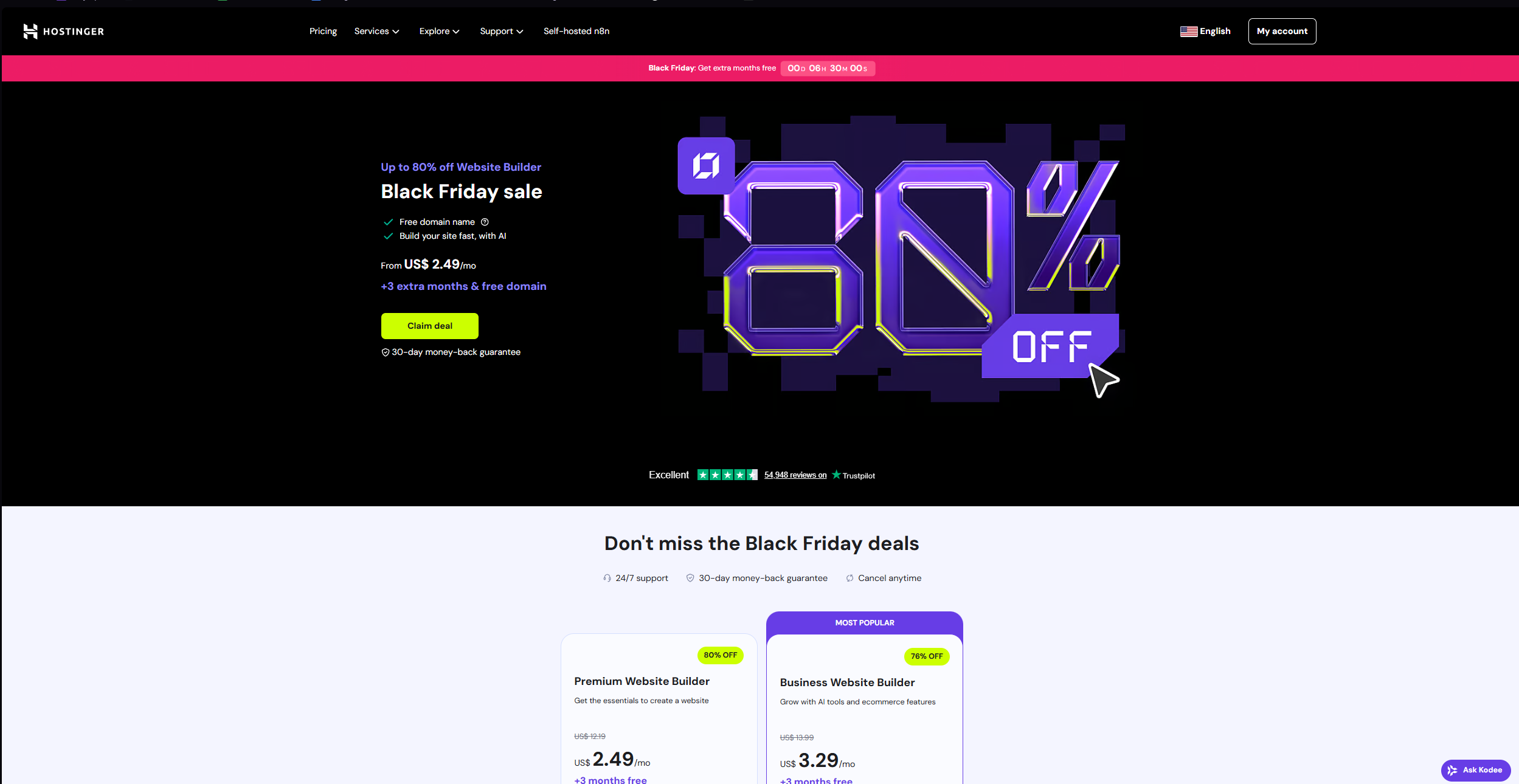
Beginning your website building journey requires more than just selecting a platform. It demands a clear action plan that transforms decision into reality. Start by signing up for your chosen platform during promotional periods to maximize savings. For Hostinger users, this means taking advantage of the Black Friday deals running November 10th through December 8th. Apply coupon code “Travis” for an additional 10% discount. Commit to the 48-month plan if possible to lock in the lowest monthly rate. You’ll also receive three bonus months free.
Once you’ve completed registration, resist the temptation to endlessly tweak your AI-generated design before launching. Instead, embrace the iterative approach. Get online quickly with a solid AI-generated foundation. Then refine and improve over time based on real user feedback and analytics. This pragmatic strategy gets you visible and operational much faster than perfectionism allows. Real-world testing provides insights that speculation never could. Remember, your website will evolve continuously. Version one simply needs to be good enough to launch, not perfect in every detail.
Maximizing AI Tools
Maximizing AI features effectively requires understanding their proper role in your workflow. AI tools excel at generating foundations, overcoming blank page syndrome, and handling repetitive tasks efficiently. However, they shouldn’t replace your unique voice and perspective. Always personalize AI-generated content to reflect your brand personality. Inject specific examples from your experience. Ensure the tone authentically represents how you communicate. This personalization transforms generic AI output into content that resonates with your specific audience. It differentiates you from competitors using identical tools.
Finally, set realistic expectations about your website launch timeline and learning curve. With AI assistance, you can genuinely have a professional-looking website live within 20 minutes of starting the process. However, building a truly effective website that achieves your business goals requires ongoing refinement. This includes content addition and optimization over weeks and months. Approach website building as a marathon rather than a sprint. Celebrate the quick initial launch while committing to continuous improvement. Learn what resonates with your audience.
Taking Action on Your Website Dreams Today

The technology enabling professional website creation has never been more accessible or affordable than it is right now in 2025. AI website builders have demolished the barriers that once prevented entrepreneurs, creatives, and small business owners from establishing compelling online presences. Whether you’re launching a blog to share your expertise, opening an online store to sell products, or creating a portfolio to showcase your work, these platforms provide everything necessary. They transform your vision into digital reality.
This analysis has revealed that while multiple viable options exist, Hostinger stands out as the optimal choice for most users. It offers the best balance of affordability, features, and ease of use. The platform’s comprehensive AI toolkit, integrated business tools, reliable performance, and exceptional value proposition make it particularly well-suited for beginners and small businesses. Meanwhile, Wix serves users needing advanced scalability and pixel-perfect control. Ionos accommodates ultra-tight budgets. Framer delights design professionals prioritizing aesthetics above all else.
The most important decision isn’t which platform you choose. It’s the decision to actually begin. Analysis paralysis prevents more websites from launching than technical limitations ever could. Armed with the insights from this guide, you now possess the knowledge necessary to make an informed platform selection. Take advantage of current promotional offers, particularly Hostinger‘s Black Friday deals and the coupon code “Travis” for additional savings. Commit to getting your website live within the next week.
Your online presence represents more than just a website. It’s your digital storefront, credibility builder, marketing engine, and connection point with customers and community. Every day without a website is a day of missed opportunities, invisible expertise, and unrealized potential. The tools exist, the knowledge is yours, and the path forward is clear. Now it’s time to take that first step. Generate your AI-powered website and join the millions of entrepreneurs who’ve discovered that building a professional online presence is no longer the exclusive domain of technical experts or big-budget businesses.
Frequently Asked Questions
How long does it actually take to build a website using AI builders?
With AI website builders like Hostinger or Wix ADI, you can have a fully designed, content-filled website generated in literally 2-3 minutes. The AI analyzes your business description and creates a complete site. This includes layout, text, and images almost instantly. However, personalizing that AI-generated foundation to truly reflect your brand takes additional time. Adding your specific content and fine-tuning design elements typically takes an additional 15-20 minutes for basic sites. More complex websites with e-commerce features or extensive content might require a few hours. These can be spread across several sessions. The key advantage is that AI eliminates the blank page problem. It gives you a professional starting point immediately rather than forcing you to build everything manually from scratch.
Do I need any coding or technical skills to use these AI website builders?
Absolutely not. These platforms are specifically designed for complete beginners with zero coding knowledge. AI website builders like Hostinger use simple text prompts. You literally just describe your business in plain English. The AI handles all the technical implementation. The drag-and-drop editors allow you to move elements around visually without ever seeing code. All the platforms discussed handle hosting, security, and technical maintenance automatically in the background. That said, having some basic comfort with technology and computers will help you navigate the platforms more confidently. However, there’s no requirement to understand HTML, CSS, JavaScript, or any programming concepts whatsoever.
Can I switch from one platform to another after I’ve built my website?
Switching platforms after building your website is technically possible but often complicated and time-consuming. Most website builders use proprietary systems and structures that don’t translate perfectly to competitors. You can typically export your content, text and images, and manually rebuild your site on a new platform. However, you’ll lose your specific design, layout, and configuration. Additionally, you’ll need to set up new hosting and transfer your domain. You’ll also need to reconfigure email and potentially rebuild e-commerce or other advanced features from scratch. Because switching is disruptive, it’s crucial to choose the right platform from the start. Carefully consider your long-term needs, not just immediate requirements. Understanding each platform’s strengths and limitations before committing saves significant headaches down the road.
Will my AI-generated website look unique or will it look like everyone else’s?
This concern is valid but largely unfounded with quality AI builders. While AI uses templates and design patterns as foundations, the combination of your specific content creates unique outputs. This includes your business description, color preferences, and industry. Platforms like Hostinger generate websites based on your exact input. This means even two businesses in the same industry will receive different designs if they describe themselves differently. Furthermore, all these platforms allow extensive customization after the initial AI generation. You can modify colors, fonts, layouts, images, and content to ensure your site reflects your distinct brand personality. The AI provides a professional starting point. However, the final result should incorporate your unique voice, specific examples, original photography, and brand elements. These differentiate you from competitors using similar tools.
Are AI website builders good for SEO and will Google rank my site?
Yes, websites built with AI platforms can absolutely rank well in Google search results. The technical foundation of platforms like Hostinger, Wix, and others meets Google’s requirements. This includes fast loading speeds, mobile responsiveness, and proper site structure. Many AI builders, particularly Hostinger, include integrated SEO tools. These generate meta titles, descriptions, and keyword suggestions automatically. However, ranking well requires more than just technical SEO. You need quality content that genuinely helps your audience. You also need regular updates and backlinks from other reputable sites. The AI builder provides the technical foundation and tools. However, your success ultimately depends on consistently publishing valuable content. You must optimize based on the AI’s suggestions and promote your site to build authority over time. An AI-built website has no inherent SEO disadvantage compared to hand-coded sites.
What happens to my website if I stop paying for the hosting service?
If you cancel your subscription or stop paying for your hosting plan, your website will eventually go offline. It becomes inaccessible to visitors. Most platforms provide a grace period of a few days to a few weeks. During this time, you can renew without losing your site. After that grace period expires, your website files are typically deleted from the platform’s servers. However, many services allow you to export your content before cancellation. This gives you a backup. Your domain name registration is usually separate from hosting. So if you own your domain, you’ll retain it even if your website hosting lapses. To avoid losing your website, set up automatic payment renewal. At minimum, set calendar reminders well before your subscription expires. The long-term commitment plans like Hostinger‘s 48-month option minimize this risk. They lock in service for years at discounted rates.
Can I build an online store and actually sell products with these AI builders?
Yes, several AI website builders include full e-commerce functionality. This allows you to sell physical products, digital downloads, or services directly from your website. Hostinger‘s Growth Plus AI plan includes complete e-commerce features. It supports unlimited products, payment processing integration, inventory management, and order fulfillment tools. Wix offers even more advanced e-commerce capabilities. It supports up to 50,000 products with sophisticated inventory and analytics features. These platforms integrate with payment processors like PayPal, Stripe, and credit card gateways. This allows customers to purchase securely. However, platforms like Framer don’t include e-commerce functionality. Ionos offers only basic selling features. If e-commerce is central to your website goals, verify that your chosen platform includes the specific selling features you need. This might include discount codes, abandoned cart recovery, or subscription billing. Check before committing.
How much does it really cost when you include domain, hosting, and all features?
Total costs vary significantly by platform and plan. Hostinger‘s 48-month Growth Plus AI plan costs approximately $3.29 per month, or less with the coupon code “Travis.” This totals around $158 upfront for hosting, AI tools, e-commerce, and email marketing. Add $10-15 annually for domain registration unless you get their free first-year domain. Wix starts at $17 monthly for basic plans but increases to $35-45 monthly for full features. These are charged as recurring monthly payments rather than upfront commitments. Ionos offers the lowest pricing with fewer features, while Framer falls in the mid-range. Always calculate total ownership costs over at least one year, including renewals, to avoid surprises.