
Most people think selling on Amazon means launching a product, ordering inventory, and risking thousands of dollars before the first sale, but Amazon affiliate marketing skips all of that. However, few people realize this quieter way to earn on the world’s biggest marketplace even exists. With an AI Amazon affiliate store, you never launch a product, never hold inventory, and never spend a single dollar upfront.
The model is simple. Amazon Associates gives you unique links to any product on Amazon. You post those links on your website or social media. When someone clicks and buys anything on Amazon within the 24-hour cookie window, you earn a commission. That’s it.
Travis Marziani has been living this for over a decade. He quit his 9-to-5 more than 10 years ago and has since made over $10 million through Amazon products, Amazon affiliate marketing, and other online businesses. In other words, he has tested every version of this model, and the AI-powered version is by far the easiest to start.
What makes this guide different is that you won’t just get a niche handed to you. Instead, you’ll see exactly how to find a winning niche and winning products using AI and real data, then build the whole store in minutes. Before we build anything, however, the entire system starts with one free account.
- Setting Up Your Amazon Associates Account
- Why "The Riches Are in the Niches"
- Three Free Ways to Find a Winning Niche and Products
- Building the Entire Store With AI in Minutes
- Creating Content That Makes People Click Your Links
- Three Prompt Tricks the Pros Use
- Taking Your Store Live for Less Than a Coffee
- Five Amazon Associates Rules That Can Get You Banned
- Your Affiliate Store Is the First Step, Not the Last
- Frequently Asked Questions
Setting Up Your Amazon Associates Account
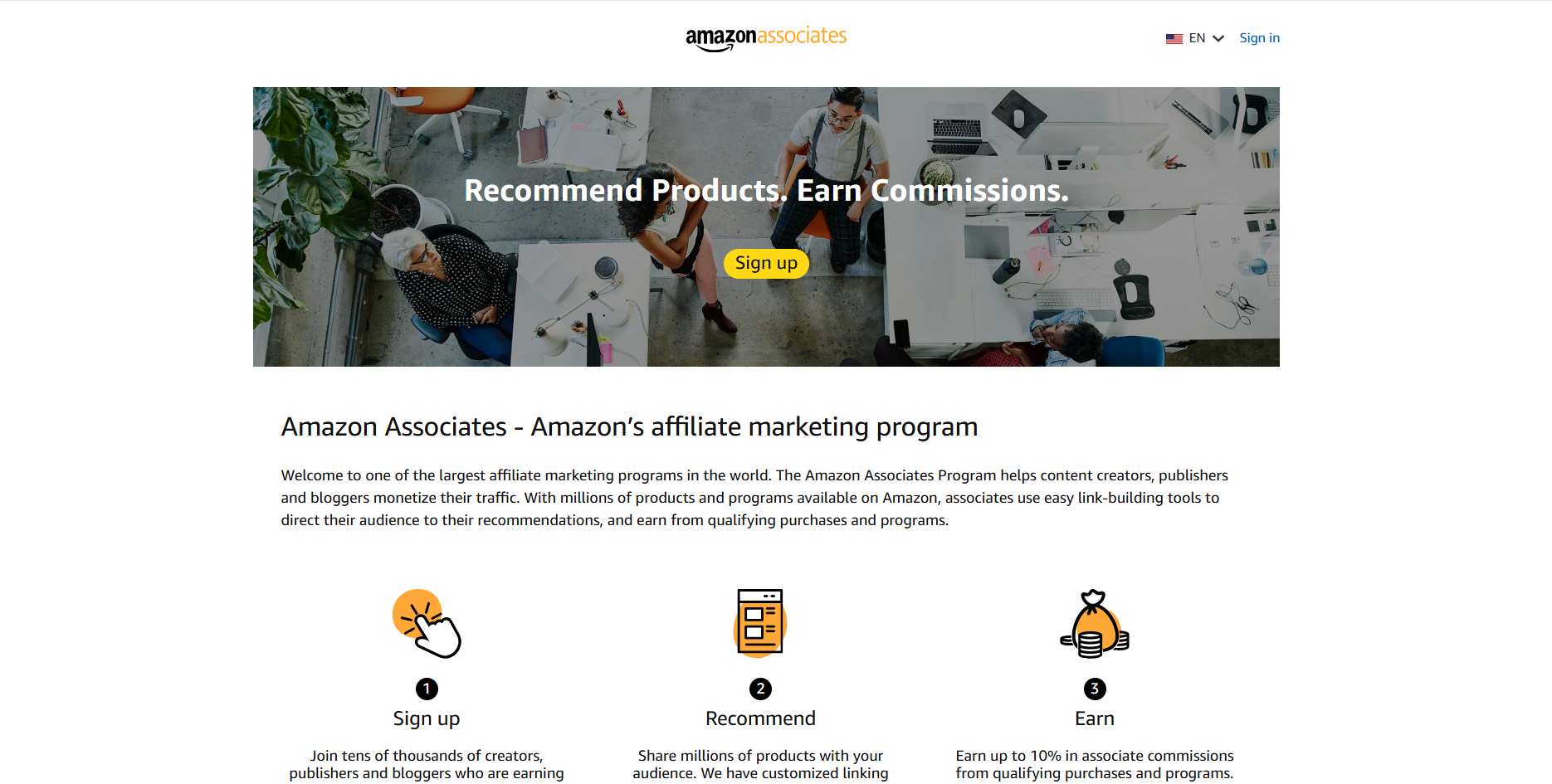
First, go to Google and search “Amazon Associates,” then click the first result. From there, click “Sign up” and either log in with your existing Amazon account or create a new one. Enter your account information and click next.
Next, Amazon asks for your website. If you don’t have one yet, don’t worry, because you’ll build one with AI shortly. For now, simply enter your preferred Associate Store ID. Travis used his own name, and you can do the same.
Once you see the confirmation page, add your tax and bank account information. This step takes a couple of minutes, and it’s the only way to actually receive your payouts. After that, your dashboard shows your clicks, commissions, and total earnings as they start rolling in.
Two Settings That Multiply Your Earnings
Inside your dashboard, navigate to OneLink. This feature monetizes international traffic automatically. Simply add countries like Canada, the UK, and France, click next, and submit. Now, when a visitor from another country clicks your link, you still get credit for the sale.
Additionally, head to amazon.com and look for the SiteStripe toolbar across the top of the page. This is how you grab your links. Find any product you want to promote, click “Text” in SiteStripe, and it generates your unique Amazon affiliate marketing link instantly. With your account live, the next step is where most beginners quietly fail.
Why “The Riches Are in the Niches”
The single fastest way to fail at Amazon affiliate marketing is trying to be about everything. People say, “I’ll build a site about fitness,” or, “I’ll review anything that sells.” Unfortunately, when you’re about everything, you stand out to no one.
Google won’t know what to rank you for. AI search tools won’t recognize you as an authority on anything. Most importantly, real people won’t have a reason to trust your recommendations over anyone else’s.
Consider the difference between “health advice” and “health advice for people working night shifts.” The second one speaks to a specific person with a specific problem. That focus is exactly what earns clicks and, eventually, commissions.
The second mistake is guessing. Picking a niche because it trended on TikTok last week is a gamble. Fortunately, you can replace guessing with data using 3 completely free methods.
Three Free Ways to Find a Winning Niche and Products

Method 1: Brainstorm With Claude AI
Open a new chat in Claude and use this prompt: “List 20 profitable affiliate niches with products sold on Amazon that are trending upward, priced between $50 and $200, and not yet oversaturated with competition.” Within seconds, you get a strong starting list.
Then, push further. Ask Claude to break a niche into audience segments and identify gaps where existing sites are weak. This turns a broad idea into several specific angles you could own.
That said, keep one thing in mind. AI has web access, but it cannot see real search volume, competition scores, or how fast a product is selling. It gives educated guesses. So, use Claude for brainstorming and organizing, and use the next 2 methods for validation.
Method 2: Validate Demand With Exploding Topics
Exploding Topics works like Google Trends on steroids. You can filter by category and see every keyword that is exploding right now. While scrolling, Travis spotted glass air fryers with a 36x increase in search volume, and the trend line was still climbing.
The next check was obvious. He searched “best glass air fryer” on Google and found almost nothing useful. There were individual product reviews and comparisons of regular air fryers, but nobody had built a proper “best glass air fryers compared” post.
As a result, he found a gap with huge and growing demand, a clear health angle, and no real competition. Even better, the whole process took less than 60 seconds.
Method 3: Find Products That Already Sell With Amazon’s New Releases Tab
Once you have a niche, you want products that are already converting. Amazon’s own New Releases tab shows you the best-selling new products, and you can drill into any category and subcategory. In fact, you can even use this tab to discover niches from scratch.
Here is the hack that multiplies your money. With glass air fryers as the niche, Travis niched down into the air fryer category to see which glass models were selling best. He found a Ninja glass air fryer performing extremely well, plus another model launched in May already doing around $175,000 a month.
When he searched Google for a review of that exact product, no professional blog existed. So, not only was it selling like crazy, nobody had created content around it. Because these products launched only 1 or 2 months ago, you can build a post around one product and own that search. Now that the research is done, here’s the part that used to take weeks.
Building the Entire Store With AI in Minutes

Why Hostinger AI Builder Replaces WordPress
So far, you have spent $0. You have a free Amazon Associates account, free niche research, and free winning products. Now, you’ll build the website for free too, and you only pay when you’re ready to go live.
Travis uses the Hostinger AI Builder for this. It bundles your domain, hosting, email, AI builder, and database in one place. Better yet, Hostinger created a ready-made Amazon affiliate marketing storefront template with product cards, buy buttons, and categories already structured.
If you watched Travis’s older tutorials, you know he used to build these sites on WordPress. Honestly, that approach is outdated now. WordPress is clunky, has a learning curve, and forces you to fight plugins to make anything look right. With the AI builder, you simply ask for what you want.
Rebranding the Template With One Prompt
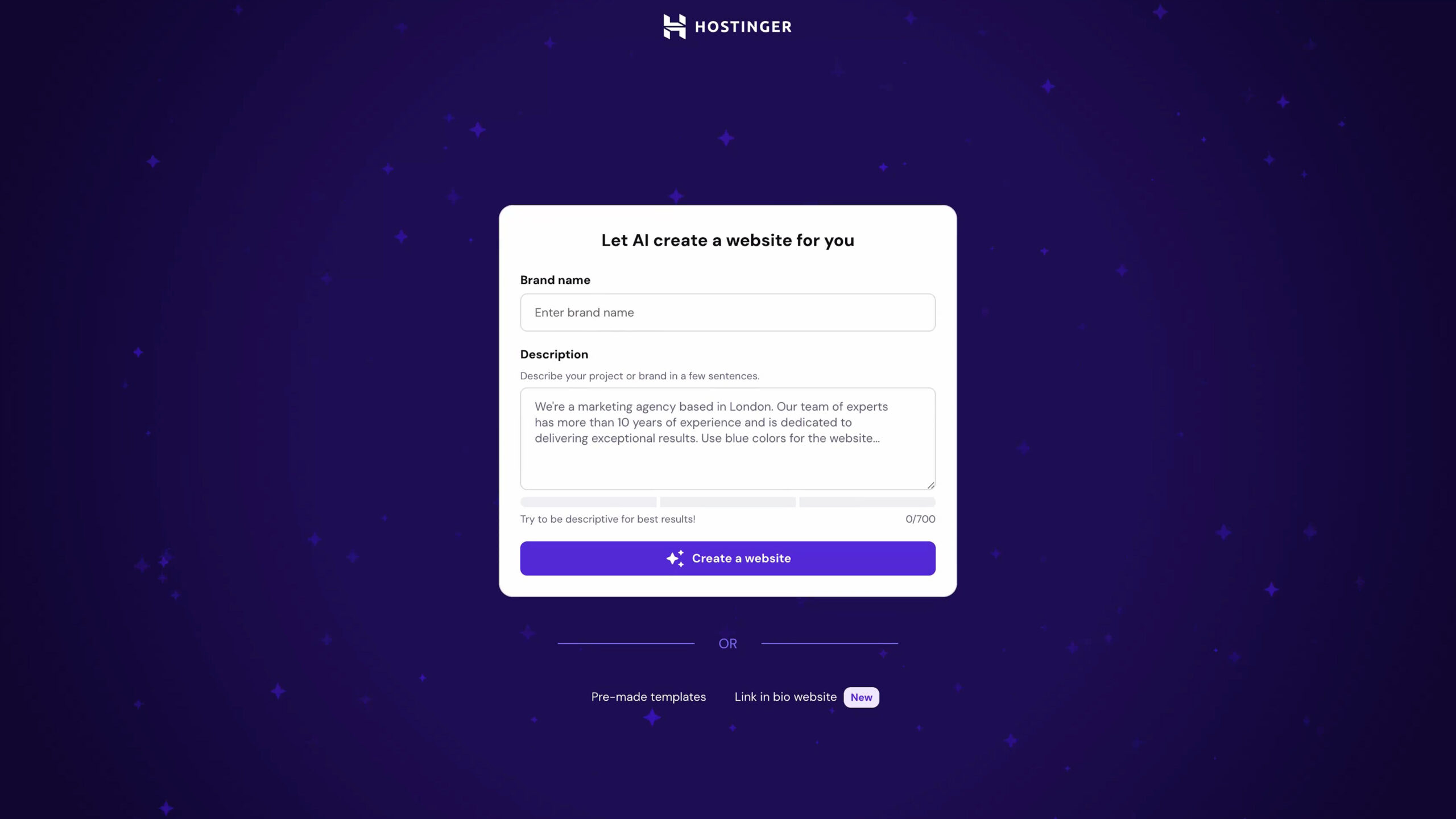
Click the link in the description, view the template, and sign up for a free Hostinger account. The template duplicates into your account instantly. Then, the AI builder takes over.
Travis typed one prompt: “Rebrand the store as non-toxickitchen.com, a non-toxic cooking store for health-conscious home cooks worried about plastic and non-stick chemicals touching their food. Give it a clean, bright, modern look using white, soft gray, and charcoal.” Just like that, the AI adapted the colors, logo, categories, and copy in one go.
If you don’t love something, simply tell the AI. You can also click “Edit content” to swap in your own images, or use “Select and edit” to change one specific section. For example, Travis tweaked the hero image and asked for a slightly transparent floating navigation bar.
Adding an Email Popup in 30 Seconds
Next, ask the AI to “create a popup offering a free non-toxic cooking guide for anyone who enters their name and email.” In about 30 seconds, it builds a working email capture.
This matters more than it seems. From day 1, you start building a list of people who care about your niche. Later, you can bring them back to your store with new posts and product picks, which means free email marketing on autopilot.
Adding Your Products
The template includes a built-in data dashboard where your products live. For each glass air fryer you found in the New Releases tab, add the name, image, a short description, and, most importantly, your Amazon affiliate marketing link.
Boom, your products are in the store. A store with products looks great, but content is what actually brings the money in.
Creating Content That Makes People Click Your Links

Turn One Product Into a Content Map With Claude

A website alone doesn’t earn commissions. Content is the value, and it’s the reason people click your links instead of going straight to Amazon. Therefore, go back to Claude and ask it to turn your product into blog ideas.
Travis’s result was a full content map. It included the main “Best Glass Air Fryers Compared” article, plus supporting posts like “Glass vs. Plastic Air Fryers: What’s Actually Touching Your Food,” “Are Air Fryers Toxic?”, and a non-toxic cook’s buying guide. It even suggested topics that let the store grow into other non-toxic cookware.
Three Rules for Content That Converts
First, choose a friendly, trustworthy tone so readers feel comfortable taking your recommendation. Second, watch your length. Make each post long enough to be useful, but not so long that people get bored.
Third, target focused keywords people actually search. “Best non-toxic glass air fryer” wins every time over a clever phrase nobody types. Consequently, your posts rank faster and attract buyers, not browsers.
Writing the Article and Placing Your Links
Now, take any idea from Claude and tell Hostinger‘s AI to write the article directly into your site. Travis prompted it to create a “Best Glass Air Fryers Compared” post using the models from the New Releases tab. Within moments, the first blog post was live.
For comparisons, ask the AI to build a clean table covering what buyers care about: price, capacity, wattage, material, fully glass versus glass bowl, rating, and who each model suits best. Then, read through the post, make sure it flows, and add your own personal spin.
Finally, place your product links and “Buy on Amazon” buttons in natural spots. The best placement is right where a reader is thinking, “Okay, which one do I get?” You can even ask the AI to add those buttons for you.
Above all, remember that it’s about value. People use your links because you organized the best options, explained which materials are safe, and saved them hours of research. Readers can tell when you know your stuff.
Three Prompt Tricks the Pros Use
The first trick is to be specific about your customer. A generic prompt gets you a generic site. Naming “health-conscious cooks worried about non-stick chemicals” is what makes the copy resonate with real people.
The second trick is to make the AI rewrite rather than invent. If you have rough notes, product facts, or specs pulled from Amazon, paste them in and say, “Turn this into a professional buying guide.” AI is far better at polishing real facts than making everything up from scratch. Claude can even gather those details for you.
The third trick, and Travis’s favorite, is to stop describing layouts with words. Instead, screenshot a layout you love from another site, drop it into the chat, and say, “Use this image as a reference for the layout.” You can even sketch on paper and upload a photo. This is the biggest time-saver for getting the exact look you want. Once everything looks right, there’s only one moment you’ll pay anything.
Taking Your Store Live for Less Than a Coffee
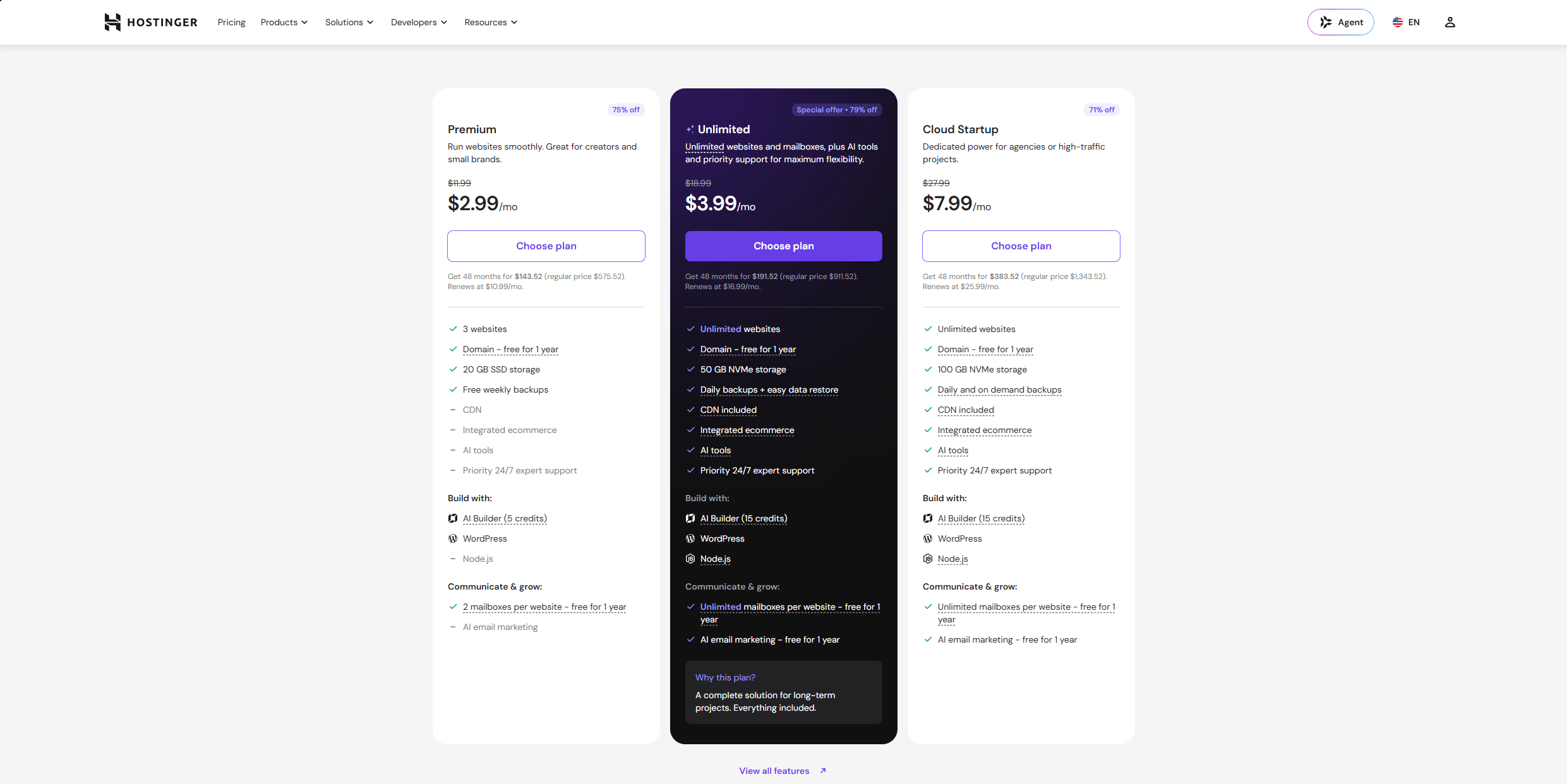
With your store built, products added, and articles live, you can hit publish. This is the only time you pay. Travis recommends the Unlimited plan because it includes all the AI features, 24/7 support, unlimited websites, and free hosting plus a domain.
Here’s a pro tip. Choose the 48-month plan to lock in the lowest monthly rate for the longest time. That works out to roughly $4 a month for a full 4 years of website and AI builder. Use coupon code TRAVIS through the link in the description for an extra 10% off the sale price.
The best part is that everything scales for free. You keep adding articles and products at no extra cost, and every new post is another door into your store.
Five Amazon Associates Rules That Can Get You Banned

Amazon’s rules are strict, and Travis has watched people lose everything by ignoring them. Fortunately, they are easy to follow once you know them.
First, never shorten your Amazon affiliate marketing links with Bitly, Pretty Links, or similar tools. Second, never place Amazon affiliate marketing links in private places like emails, PDFs, or ebooks. Your links must be publicly accessible on your site or social media only.
Third, don’t list prices on your site. Amazon prices change constantly, and a wrong price destroys trust and can violate the terms. Let the price show on Amazon. Fourth, always disclose that you use affiliate links. Transparency keeps you compliant and keeps your audience on your side.
Finally, never buy through your own links, and never let friends or family buy through them if they’ve ever shared your Wi-Fi or IP address. Amazon tracks this, flags it, and permanently bans accounts. Follow these 5 rules, and your account can run smoothly for years.
Your Affiliate Store Is the First Step, Not the Last

Look at what you’ve built. A free Amazon Associates account, a validated niche found with real data, winning products pulled from Amazon’s own bestseller lists, and a complete AI Amazon affiliate store with content that converts. The only cost is a hosting plan cheaper than a cup of coffee.
This is a real, repeatable path to passive income, even with zero tech skills. Your store works while you sleep, and every new article compounds the results.
However, affiliate commissions are only a small slice of each sale. Owning your own product is where the real money is. That’s exactly what the Passion Product Formula teaches: how to turn one simple idea into a $100,000-a-year profit machine by launching your own niche brand on Amazon FBA.
So, start your affiliate store today with the Hostinger link and coupon code TRAVIS. Then, when you’re ready to level up, watch the Passion Product Formula video to learn how to build a product and a brand you truly own.
Frequently Asked Questions
How much does it cost to start an AI Amazon affiliate store?
Almost nothing. The Amazon Associates account, the niche research, and the store build are all free. You only pay for hosting when you publish, which can be as low as around $4 a month on a 48-month Hostinger plan.
How much commission does Amazon Associates pay?
Rates vary by product category. Importantly, you earn on anything the visitor buys within 24 hours of clicking your link, not just the product you recommended.
Do I need a website to join Amazon Associates?
No. You can sign up first, choose a store ID, and add your website later once it’s built.
How long until an affiliate store makes money?
It depends on traffic. However, targeting low-competition niches like the glass air fryer example helps your posts rank much faster.
Is affiliate marketing better than selling on Amazon FBA?
Affiliate marketing is a fantastic starting point with zero risk. That said, launching your own product has far higher upside, which is why the Passion Product Formula is the natural next step.